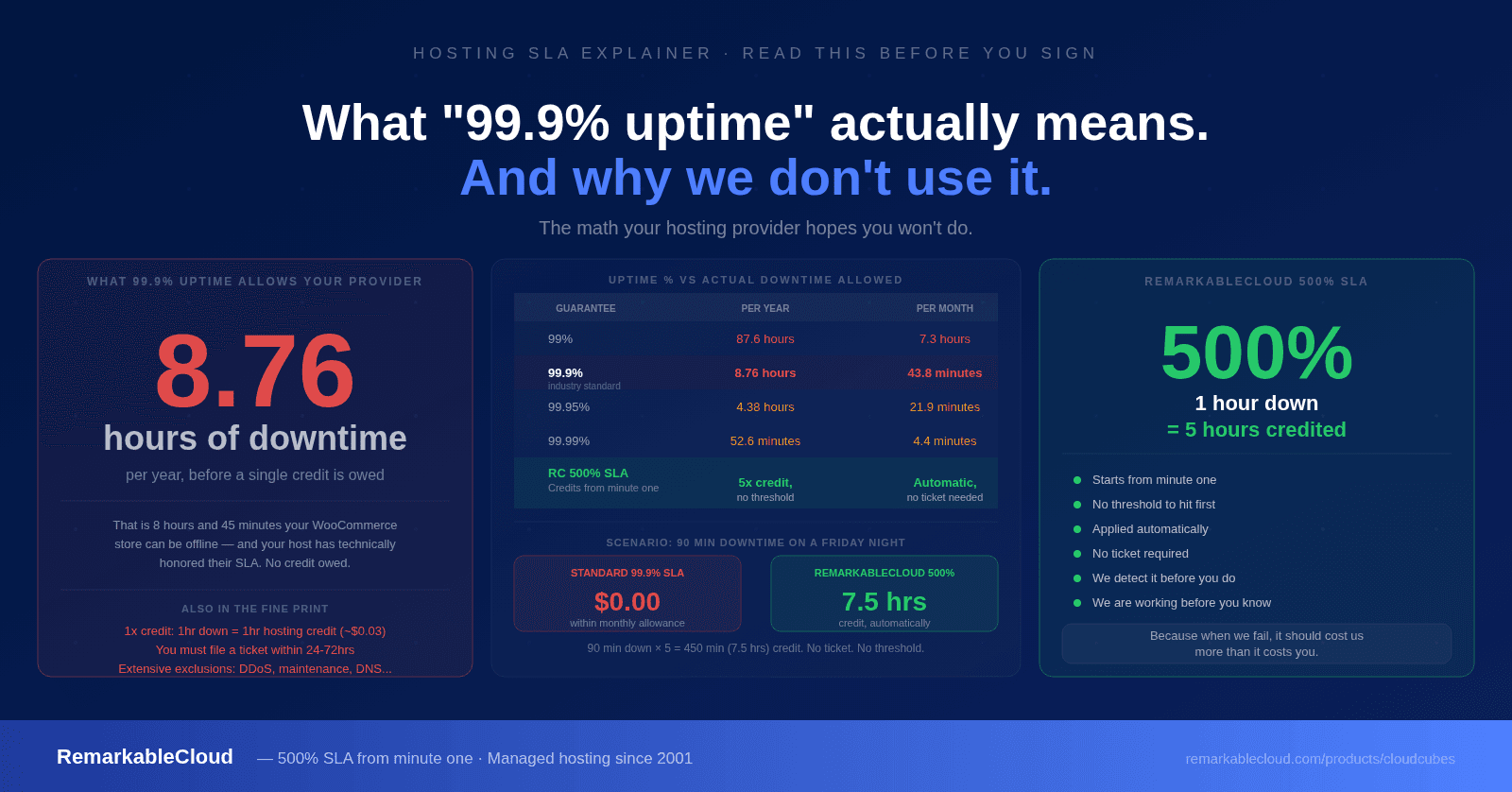
What "99.9% uptime" actually means. And why we don't use it.
99.9% uptime sounds excellent. It is the number most hosting providers lead with, and it is the number most customers accept without questioning it. But the math behind that number tells a very different story, and the contract terms that surround it make it even less impressive than the math suggests.
This article breaks down exactly what 99.9% uptime means in practice, what the SLA fine print typically says, and why we built our 500% SLA around an entirely different philosophy.
The math nobody does out loud
99.9% uptime sounds like near-perfection. Let us convert it to something more concrete.
| Uptime guarantee | Allowed downtime per year | Allowed downtime per month | Allowed downtime per week |
|---|---|---|---|
| 99% | 87.6 hours | 7.3 hours | 1.68 hours |
| 99.9% | 8.76 hours | 43.8 minutes | 10.1 minutes |
| 99.95% | 4.38 hours | 21.9 minutes | 5 minutes |
| 99.99% | 52.6 minutes | 4.4 minutes | 1 minute |
| RemarkableCloud 500% SLA | Credits from minute one: no allowed downtime threshold | 5x credit on every minute down | 5x credit on every minute down |
That is 8 hours and 45 minutes of downtime per year before your hosting provider owes you a single minute of credit. Your WooCommerce store can be offline for an entire business day and your host has technically honored their SLA.
Put it in business terms. If your store generates $500 per hour, 8.76 hours of allowed downtime represents $4,380 in potential lost revenue, all within the bounds of a "99.9% uptime guarantee" that most providers market as a promise of reliability.
The fine print that makes the headline number almost meaningless
The percentage alone is only part of the picture. What most customers do not read is how SLA credits are structured in the contract. The typical terms make the guarantee significantly weaker than it appears.
Threshold before credits apply: Most SLAs only trigger after the uptime guarantee has been breached. With a 99.9% SLA, credits do not start until your server has been down for more than 43.8 minutes in a single month. The first 43 minutes of downtime are free for the provider.
Credits are not cash: SLA credits are almost always applied to your next invoice as account credit. They do not compensate you for lost revenue, customer damage, or business impact: they offset a fraction of your hosting cost.
Credit rate is typically 1x: One hour of downtime earns you one hour of hosting credit. If you pay $20/month, one hour of downtime earns you roughly $0.027 in credit, while your store may have lost hundreds of dollars in revenue.
You have to file a claim: Most providers require you to submit a support ticket within a specific window (often 24 to 72 hours) to claim SLA credit. If you do not file the ticket, you receive nothing.
Exclusions are extensive: Scheduled maintenance, third-party network issues, DNS propagation, DDoS attacks, and customer-caused issues are typically excluded. The list of events that do not count toward the SLA is often longer than the SLA itself.
These terms are not unusual or predatory: they are standard across most of the hosting industry. Most customers simply do not read them carefully enough to know what they have agreed to.
What this looks like in real scenarios
Your WooCommerce store is offline for an hour and a half during what turns out to be a decent late-night shopping window. You notice it Saturday morning and submit a support ticket.
Under a standard 99.9% SLA: 90 minutes is within the monthly allowance (43.8 minutes). No credit is owed. If your plan costs $20/month, you receive nothing for 90 minutes of downtime and whatever revenue was lost during that window.
Credit received: $0.00You run a promotional email to your list. The server goes down 20 minutes after the campaign sends and stays down for 3 hours. The timing is the worst possible: peak traffic, peak purchase intent.
Under a standard 99.9% SLA: 3 hours exceeds the monthly threshold of 43.8 minutes, so credits apply to the excess (roughly 2 hours and 16 minutes). At $20/month, that is a credit of approximately $0.062. The downtime has likely cost you orders, customer trust, and campaign effectiveness.
Credit received: ~$0.06 for ~$500-2,000 in potential lost revenueDowntime is detected by our proactive monitoring before you notice it. Our team is working on resolution immediately. Every minute of downtime earns you 5 minutes of credit, from the first minute, applied automatically with no ticket required.
In Scenario 1: 90 minutes down = 450 minutes (7.5 hours) of service credit, automatically. In Scenario 2: 3 hours down = 15 hours of service credit, automatically.
Credit received: 5x the downtime value, from minute one, without filing a ticketWhy the industry settled on 99.9%
This is not a conspiracy. 99.9% became the industry standard because it is an achievable number for most competently run infrastructure, it sounds impressive to customers who do not do the math, and the credit structure that accompanies it limits provider financial exposure while maintaining a veneer of accountability.
It also creates a perverse incentive: a 1x credit SLA means that the cost of downtime to the provider is capped at the cost of the hosting itself, regardless of what the downtime costs the customer. There is no financial pressure to minimize downtime beyond the threshold, because the maximum SLA liability is a fraction of the subscription fee.
A 500% SLA creates a different incentive structure. If one hour of downtime costs us five hours of credit, we are financially motivated to resolve incidents faster, invest more in redundancy, and build infrastructure that minimizes failure. The SLA is not a liability cap: it is a statement of how seriously we take reliability.
The 500% SLA: how it actually works
- Credits only after monthly threshold is breached
- You must file a support ticket within 24-72 hours
- 1x credit: 1 hour down = 1 hour credited
- Credits applied to next invoice only
- Extensive exclusion list
- Your business impact: your problem
- Credits start from minute one, no threshold
- Applied automatically, no ticket required
- 5x credit: 1 hour down = 5 hours credited
- Our monitoring detects issues before you do
- Our team is working before you know there is a problem
- We care about your business impact, not just the uptime number
The practical difference is this: on a RemarkableCloud Cloud Cube, if your server goes down, we know before you do, we are working on it, and you receive 5x credit for every minute it is down, without lifting a finger. No ticket, no threshold, no calculation.
Why we do not market a specific uptime percentage
We do not publish a "99.99% uptime guarantee" because we think uptime percentage marketing is fundamentally misleading. The number strips away all the context that makes it meaningful: the threshold before credits apply, the credit rate, the exclusions, the claim process, and the gap between hosting cost and business impact.
The 500% SLA says something different. It says: when we fail, we pay more than you do. It aligns our financial interest with your uptime in a way that a percentage target does not. It is harder to explain in a headline, but it is a more honest representation of accountability.
We have been running managed servers since 2001. In 25 years, we have resolved incidents that would have triggered SLA credits under any system. The 500% SLA is not a marketing claim: it is the consequence of building a business where server reliability is not optional.
500% SLA on every Cloud Cube. From minute one, automatically. First month from $2.00.
See Cloud Cube plans →A hosting SLA that actually costs us something when we fail.
500% SLA from minute one, no threshold, no ticket required. Proactive monitoring, managed since 2001. First month from $2.00.
See Cloud Cube plans