Critical cPanel authentication bypass vulnerability: what happened, what it means, and how RemarkableCloud responded
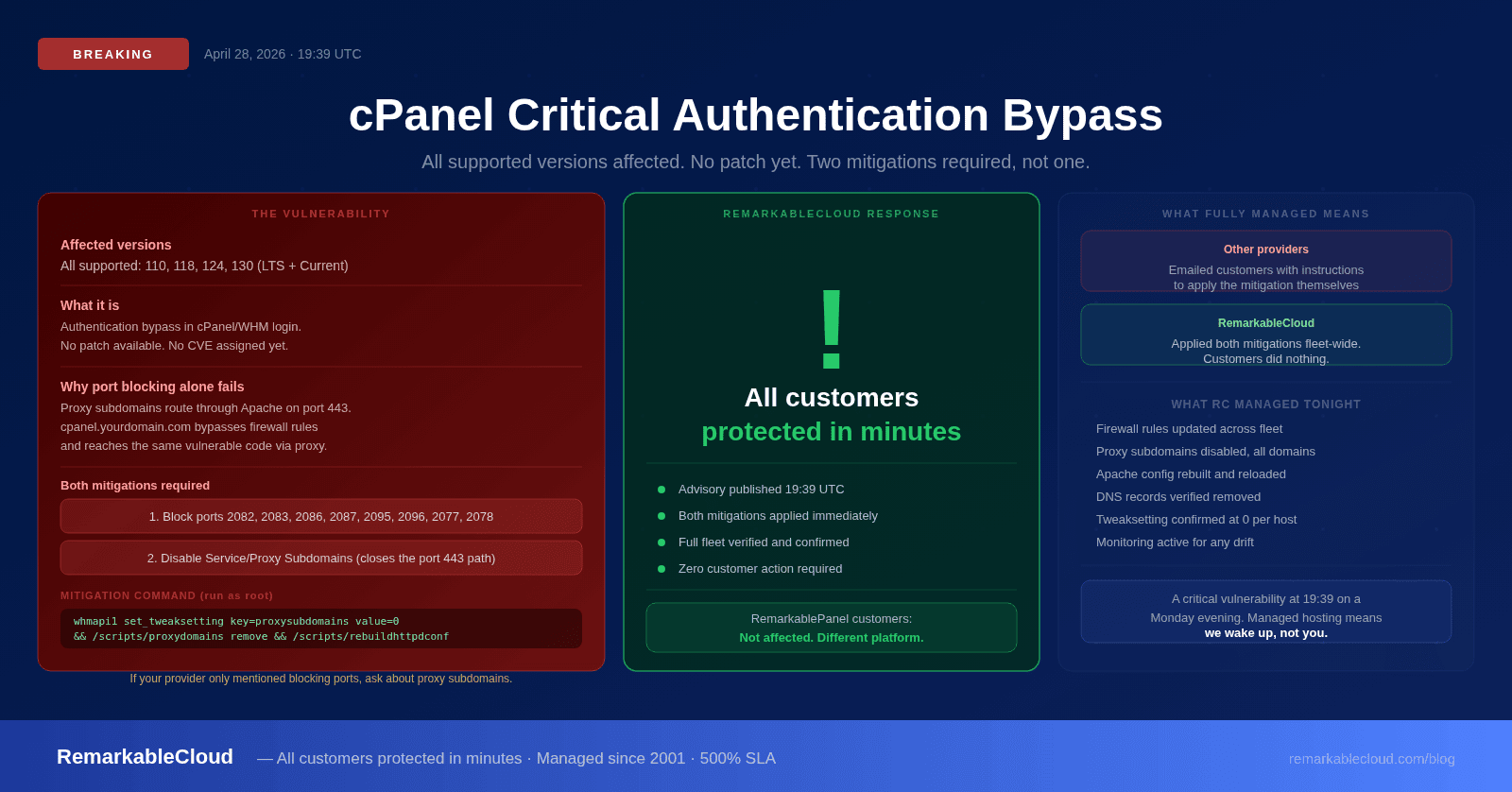
At 19:39 UTC on April 28, 2026, cPanel published a critical security advisory disclosing an authentication bypass vulnerability affecting every currently supported version of cPanel/WHM. A patch is now available. cPanel has pushed updates for all supported versions. Run /scripts/upcp on every cPanel server immediately. The advisory recommends two mitigations, and most of the public coverage published in the first hours after disclosure only mentioned one of them.
This article covers what the vulnerability is, why blocking ports 2083 and 2087 alone is not sufficient, the complete mitigation playbook, and how RemarkableCloud responded for every customer on our platform.
What cPanel disclosed
A critical vulnerability was recently identified in the cPanel software regarding an authentication login exploit. This affects all currently supported versions of cPanel. Currently, we are actively building a patch for all supported versions of cPanel/WHM to address this and ensure the integrity of the cPanel product. In the meantime, using a firewall to block access to TCP ports 2083/2087 will prevent unauthorized access, but would also restrict all other access to the control panel as well. In addition, we also recommend disabling Service Subdomains (aka Proxy Subdomains).
The key facts from the advisory:
- All currently supported versions are affected: 110, 118, 124, and 130 (both LTS and Current release tracks)
- No CVE number, no SEC ID, and no researcher attribution at the time of disclosure, which is unusual for cPanel, whose recent advisories have named the discoverer within hours
- No patch available yet. The vendor is building one.
- Two mitigations are required, not one
Why blocking ports 2083 and 2087 alone is not enough
This is the part most providers got wrong in their initial communications. The advisory text mentions port blocking first, but it also explicitly recommends disabling Service Subdomains. Those two mitigations are not optional alternatives: they address two different attack paths to the same vulnerable code.
cPanel's "Service Subdomains" feature (also called Proxy Subdomains) automatically creates DNS records and Apache reverse-proxy rules that make the panel accessible via standard web subdomains:
| Subdomain | Proxies to |
|---|---|
| cpanel.yourdomain.com | localhost cpsrvd on port 2083 |
| whm.yourdomain.com | localhost cpsrvd on port 2087 |
| webmail.yourdomain.com | localhost cpsrvd on port 2096 |
| webdisk.yourdomain.com | localhost cpsrvd on port 2078 |
The reverse proxy runs inside Apache on port 443, the same port your websites use, the port you cannot block without taking down every customer site on the server. Here is the request flow:
- A request arrives at
https://cpanel.yourdomain.com/login/ - Apache matches the proxy vhost on port 443 (not blocked by your firewall)
- Apache forwards the request internally to
https://127.0.0.1:2083/login/ - cpsrvd processes the request through the same vulnerable authentication code
The firewall blocks external connections to port 2083. The Apache proxy connects internally from the server itself, bypassing the firewall entirely. Blocking 2083 stops direct access. It does not stop the proxy path. Both mitigations are required to close both paths.
If your hosting provider's status update only mentioned blocking cPanel ports: ask them whether they also ran the proxy subdomain disable command. The proxy path remains open until that second step is completed. A server with port blocking but active proxy subdomains is still reachable through port 443.
How RemarkableCloud responded
Our security team monitors vendor advisories in real time. The moment the cPanel advisory was published, we began rolling both mitigations across our entire infrastructure. Every RemarkableCloud customer was protected before most providers had even published a status page update.
This is what "fully managed" means in practice. You did not receive a warning email asking you to take action. You did not need to SSH into your server and run a command. Our team applied both layers of mitigation (port restrictions and proxy subdomain disabling) across the fleet before this vulnerability had meaningful time to be exploited.
We ran both mitigations in parallel across all servers using verified commands, confirmed the tweaksetting value returned 0 on every host, and spot-checked DNS to confirm proxy subdomain records were removed. The entire fleet was secured in minutes, not hours.
For the record: RemarkableCloud customers running RemarkablePanel are not affected by this vulnerability at all. RemarkablePanel is built on the Enhance platform, a completely separate codebase from cPanel/WHM. This advisory applies specifically to servers running cPanel software.
The complete mitigation playbook
For hosting providers and server administrators who need to apply this themselves, here is the full two-layer mitigation. Both layers are required.
Block all cPanel-related ports at the firewall
The advisory names 2083 and 2087, but cPanel support and major providers have confirmed the conservative approach is to block all eight panel ports. cpdavd and webmail run inside the same cpsrvd process as the vulnerable login code.
| Port | Service |
|---|---|
| 2082 | cPanel HTTP |
| 2083 | cPanel HTTPS |
| 2086 | WHM HTTP |
| 2087 | WHM HTTPS |
| 2095 | Webmail HTTP |
| 2096 | Webmail HTTPS |
| 2077 | WebDAV HTTP (cpdavd) |
| 2078 | WebDAV HTTPS (cpdavd) |
For CSF on a single host, remove all eight ports from your TCP_IN list. For a perimeter firewall, block the full range inbound from the internet. During an unpatched authentication bypass window, even an admin source IP reaching the panel is unnecessary risk. Use SSH for emergency operations until the patch is confirmed installed.
Disable Service Subdomains on every cPanel host
This is the load-bearing mitigation. Without this step, port blocking is incomplete. Run the following as root on every cPanel server:
What each step does:
- whmapi1 set_tweaksetting: disables auto-creation of new proxy subdomain records
- /scripts/proxydomains remove: removes existing cpanel.*, whm.*, webmail.*, webdisk.* DNS records across all zones
- /scripts/rebuildhttpdconf: regenerates Apache configuration without the proxy vhost stanzas
- /scripts/restartsrv_httpd: graceful reload of Apache (or LiteSpeed on LSWS hosts)
The command chain is idempotent: running it twice causes no harm. On a server with a large number of domains, the zone rewrite takes 30 to 60 seconds. The whole operation completes in under two minutes.
Verify the mitigation is in place:
Do not roll back either mitigation until you have confirmed the patched cPanel build is installed on every server in your fleet. One server with proxy subdomains re-enabled and an un-upgraded cPanel version exposes every customer account on that server. Wait for the official TSR from cPanel before reversing either layer.
What we still do not know
The vendor advisory is intentionally thin on technical detail, which is standard practice during an active unpatched window. A few open questions at time of writing:
- The CVE and SEC ID. cPanel will assign identifiers when they publish the Targeted Security Release (TSR). Recent cPanel critical advisories (CVE-2025-66429, SEC-575) carried bylines within hours of disclosure; this one does not, which is notable.
- Whether two-factor authentication is bypassed. The advisory does not say either way. The 2024 SEC-575 issue bypassed 2FA via brute force. Whether this authentication bypass also skips the 2FA layer is unknown until the TSR is published.
- Active exploitation in the wild. As of the first hours after disclosure, there are no confirmed public reports of active exploitation. This will change once a proof-of-concept is published, which typically happens within 24 to 72 hours of a critical advisory on widely-deployed software.
What to do right now
The patch is available. Update every cPanel server immediately:
Once the patched version is confirmed on all servers, the mitigations can be safely reversed:
Do not reverse either mitigation until the patched build is confirmed on every server in your fleet. One unpatched server with proxy subdomains re-enabled is enough to expose every customer account on it.
The broader point
This incident illustrates something important about what "managed hosting" actually means. Every cPanel-based hosting environment in the world was exposed by this advisory today. The difference between providers is not whether the vulnerability exists: it is how fast the operator responds and whether their customers had to do anything about it.
Our customers did nothing. They did not receive an action-required email. They did not log in to run a command. They were protected before most of the industry had finished writing their status updates. That is 25 years of operational experience producing a response time measured in minutes, not hours.
If you are on a managed VPS with a provider that sent you instructions to apply this mitigation yourself, that is worth reflecting on. A managed server should be managed, especially when a critical vulnerability drops at 19:39 UTC on a Monday evening.
Managed hosting means we handle the emergencies. Not you.
Critical vulnerability disclosed. All RemarkableCloud customers protected in minutes. Zero action required from customers. That is what fully managed means.
See Cloud Cube plans