Managed vs unmanaged server: which is right for your business?
The managed vs unmanaged decision isn't really a technical question. It's a business question: does your team have the time, expertise, and operational capacity to run a server reliably, or is that time better spent on the work your business actually does?
The answer changes depending on your team size, technical depth, risk tolerance, and what you're hosting. This guide cuts through the feature lists and gives you a decision framework based on the real operational differences.
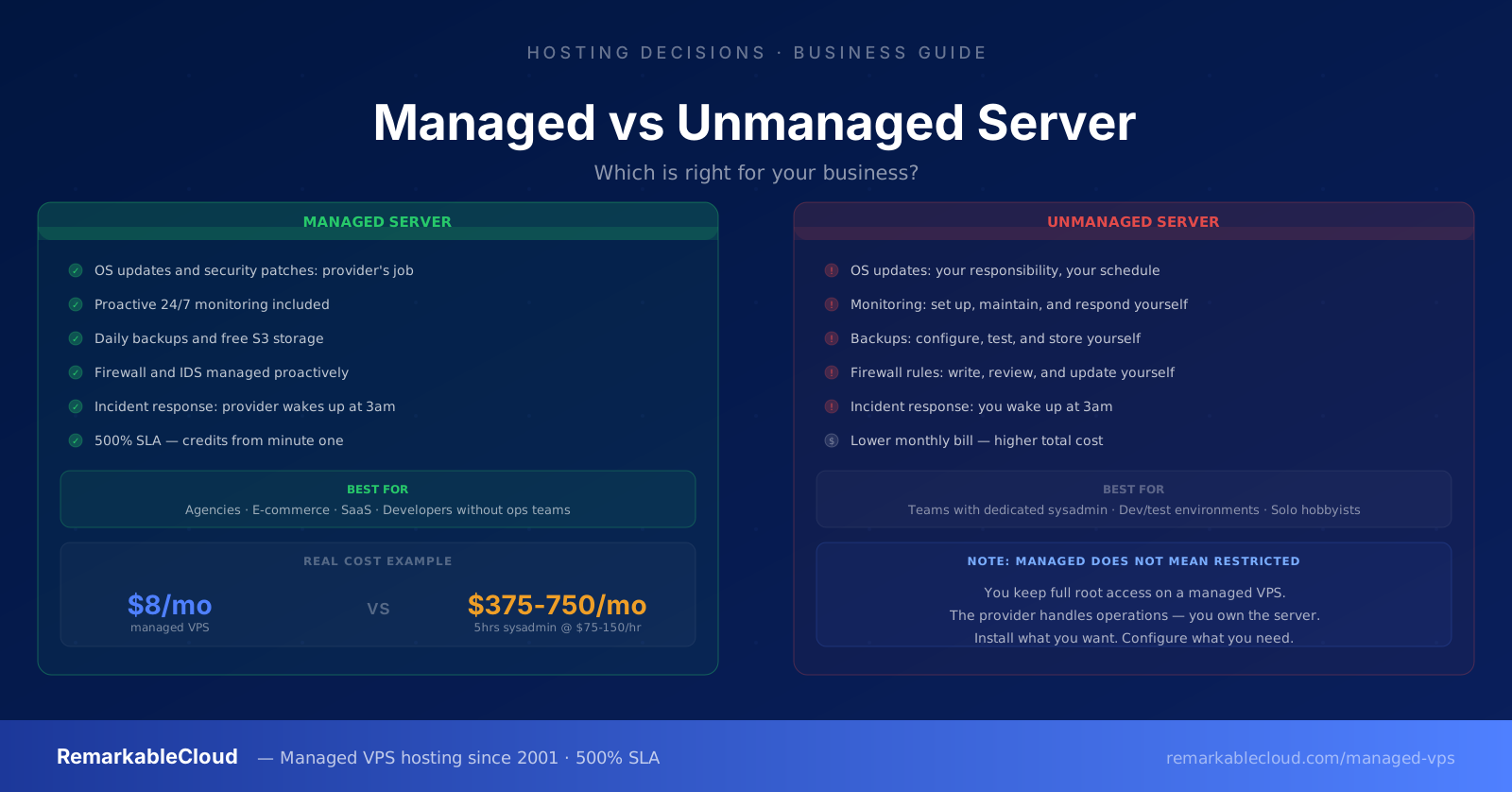
- Managed server: The hosting provider handles OS updates, security patches, monitoring, backups, firewall management, and incident response. You own and control the server, they run it.
- Unmanaged server: You get root access to a server. Everything else, including keeping it secure, updated, and running, is your responsibility.
What "managed" actually covers
Managed hosting means different things at different providers. Some call themselves "managed" because they offer a control panel. Others manage the full stack. When comparing, ask specifically what is and isn't covered.
At RemarkableCloud, managed includes:
- OS and kernel updates — applied proactively, tested before deployment
- Security patching — zero-day patches applied rapidly, not on a quarterly schedule
- Proactive monitoring — CPU, RAM, disk, network, process health, checked continuously
- Incident response — issues resolved before you notice them, not after a ticket
- Daily snapshots — automatic restore points, offsite storage
- Firewall and IDS management — rules maintained, threats blocked
- Mail gateway — inbound and outbound anti-spam, maintained and monitored
- Free server migration — we move your server, you don't
What managed does not typically include: application development, code deployments, database schema changes, or content management. You own the applications on the server. We own the server they run on.
What unmanaged actually requires
Unmanaged is often presented as the "power user" option, which makes it sound straightforward. In practice, running a production server unmanaged requires consistent execution of a set of operational tasks that don't stop when your project does.
If you choose unmanaged, these are your responsibilities:
- OS updates and kernel upgrades
- Security patch monitoring and application
- Firewall rule management
- Log monitoring and alerting
- Backup setup, testing, and rotation
- SSL certificate renewal
- Service restarts after updates
- Disk space management
- Server down at 3am: you're the one waking up
- Hacked site: forensics, cleanup, and hardening on you
- Database corruption: recovery from your backups
- DDoS: mitigation configuration is yours
- Disk full: find and resolve before total failure
- Misconfigured update: rollback and diagnosis
None of these are impossible. Experienced sysadmins handle them routinely. But for a business that isn't a hosting company, this represents a significant and ongoing operational burden that has no off switch. If your server gets compromised on a Friday night, someone needs to respond — and that person isn't an external team you're paying a monthly fee.
The real cost comparison
Unmanaged servers cost less on the monthly bill. The total cost is a different calculation.
| Cost factor | Managed | Unmanaged |
|---|---|---|
| Monthly server fee | Higher (includes management) | Lower (hardware only) |
| Sysadmin time (monthly) | Zero — included | 2 to 10+ hours/month |
| Security incident cost | Covered — RC responds | Your time + potential data loss |
| Downtime cost | 500% SLA credited automatically | Fully absorbed by you |
| Monitoring setup | Included | Datadog, Uptime Robot, etc. — extra cost |
| Backup infrastructure | Included (free S3 storage) | S3 or backup service — extra cost |
| On-call responsibility | RemarkableCloud (24/7) | Your team |
For a business billing at $75 to $150/hour, 5 hours of monthly sysadmin time costs $375 to $750. A managed VPS from RemarkableCloud starts at $8/month. The math is straightforward for any business that doesn't employ a full-time sysadmin.
Who should use unmanaged
Unmanaged is the right choice when one or more of these is true:
- Your team includes a full-time sysadmin whose job includes server operations
- You need a non-standard OS configuration that managed hosting can't accommodate
- You're running infrastructure experiments or dev/test environments where uptime isn't critical
- You have the skills and genuinely enjoy the operational side of server management
Who should use managed
Managed is the right choice for the majority of businesses hosting production workloads:
- Web agencies running client sites — you're hired for design and development, not sysadmin work
- E-commerce businesses where downtime directly costs revenue
- SaaS companies at early stages without dedicated infrastructure staff
- Developers who want control of their apps but not the ops overhead
- Businesses that have been on shared hosting and are ready for VPS performance without the complexity
RemarkableCloud's managed VPS includes full server management, 500% SLA, proactive monitoring, daily backups, and free migration. The server is yours, we run it.
See plans from $8/mo →Your server. Our ops team. From $2 your first month.
Fully managed VPS with proactive monitoring, 24/7 human support, and 500% SLA. We handle the server so you can handle the business.
See Cloud Cube plans