Why your translation plugin might be quietly killing your SEO (we just found it doing this to us)
For the past few months, something started feeling off in our analytics. Spanish-speaking visitors (historically our strongest international segment) had been declining steadily. At first we wrote it off to seasonality. Then to the broader Latin American economic mood. Then to "Google probably changed something."
None of those were the real answer.
When we finally sat down to audit our own multilingual setup, we found that the translation plugin we had been using for years had been silently damaging our SEO across every Spanish-language page on the site. Brand names mangled in metadata. Schema entities pointing to the wrong URLs. Hreflang declarations Google was probably ignoring entirely. Canonical tags inconsistent with the rest of the site. Breadcrumbs sending Spanish visitors back to English pages.
We have been hosting websites for 25 years. We design our own infrastructure, run our own mail servers, write our own monitoring, and we still missed this. Because translation plugin output looks fine on the surface. The damage is in the parts of the page that visitors do not see and most site owners never check.
If you run a multilingual WordPress site, there is a real chance some of these problems are happening on yours right now. Here is what to look for, why each one matters, and how to check.
The five problems
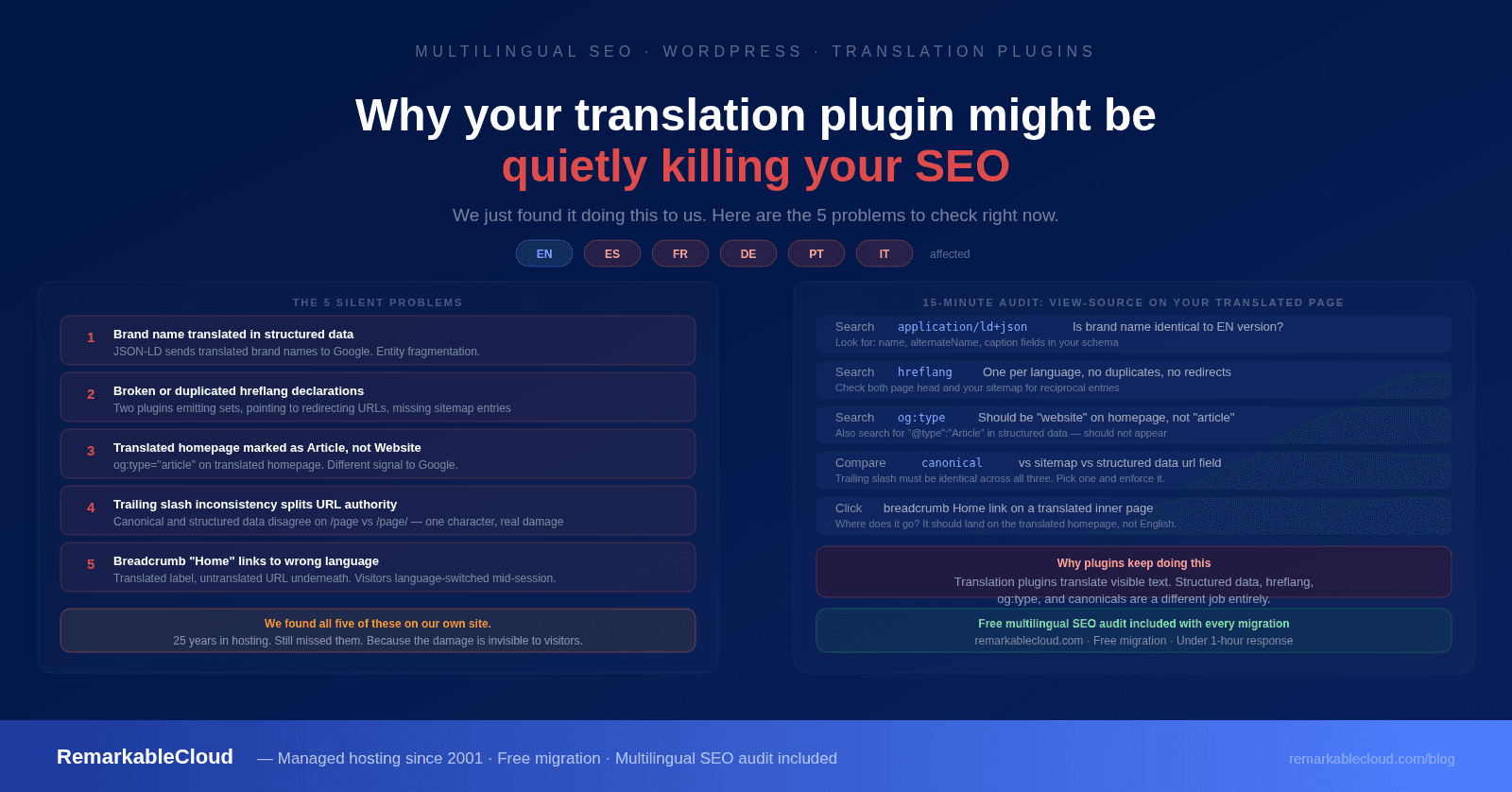
Open your site in Spanish (or whichever language you offer) and view the page source. Search for application/ld+json to find your structured data. Look at the entity fields: name, alternateName, caption, description.
If your brand name appears translated, for example, "Cloud Notable" instead of "RemarkableCloud," or "Nube Notable", your translation plugin has crossed a line it should not cross. Brand names are proper nouns. They are not supposed to translate. But many translation plugins treat all text equally and run brand strings through their translation engine, sending the translated version into your structured data.
Google reads structured data as authoritative metadata about your site. When the brand field does not match across languages, Google's understanding of your business as a single entity fragments. Worse, your knowledge graph entry (that business panel that appears in search results) can show inconsistent or wrong names depending on which language version Google indexed last.
Your brand name should appear identically in every language version of your site. View source on your translated pages and search for your brand name in the structured data. The only fields that should change are the descriptive content around the brand, not the brand name itself.
Hreflang tells search engines "this page exists in English at URL A, in Spanish at URL B." Done correctly, it consolidates SEO authority across language versions and prevents duplicate content penalties. Done incorrectly, it actively confuses Google.
We found three distinct problems on our own site:
- Duplicated hreflang declarations. Both the translation plugin and our SEO plugin were emitting their own sets, so Google was seeing each pair twice. Some search engines treat duplicates as a signal something is broken and back off.
- Missing reciprocal annotations in the sitemap. The EN sitemap entries did not reference their ES counterparts, and vice versa. We had hreflang in the page head, but the sitemap was language-incomplete.
- Pointing to URLs that 301-redirect. Our hreflang said the ES version was at /es/page/ (with trailing slash) but the actual canonical URL was /es/page (no slash). The hreflang URL redirected, which Google treats as ambiguous.
Open your translated page, view source, and search for hreflang. You should see exactly one declaration per language pair, pointing to URLs that return HTTP 200 directly with no redirect in between.
This one is subtle but damaging for SEO. Many WordPress SEO plugins detect that your translated homepage is being served from a regular post or page object and default to marking it as og:type="article" in OpenGraph metadata. They also add Article schema to the structured data.
A homepage is not an article. Article markup tells Google "this is time-sensitive content with a published date and an author." Your homepage is neither of those things. Search engines weight Article-tagged content differently from WebPage-tagged content, and a homepage incorrectly tagged as Article tends to underperform in branded searches.
We had this on our Spanish homepage but not our English one. The two pages were sending different signals to Google about the same business.
View source on your translated homepage. Search for og:type: it should be website (or business.business for B2B sites), not article. Search for "@type":"Article". There should not be one on a homepage.
Some WordPress sites use trailing slashes (example.com/about/). Some do not (example.com/about). Either is fine, as long as you are consistent. Translation plugins frequently are not.
We found that our Spanish homepage canonical was being emitted without a trailing slash, but Spanish entries inside our structured data were referencing the same homepage with a trailing slash. Google sees these as different URLs even when both resolve to the same content. URL authority gets split. Internal linking signals get confused.
Pick any page on your site. Compare the <link rel="canonical"> URL, your sitemap entries for that page, any internal links pointing to it, and the url field in any structured data. If they are not all identical (slash or no slash matching exactly), you have inconsistency that needs fixing.
Translation plugins often translate the visible text of breadcrumbs ("Home" becomes "Inicio") but forget to translate the link underneath. Spanish visitors clicking "Inicio" land on the English homepage instead of the Spanish one. Mid-session, they are language-switched without warning.
This breaks user trust and damages the bounce-rate signal Google uses to rank pages. A high-quality Spanish page with a broken Spanish breadcrumb performs worse than a mediocre Spanish page with intact navigation.
Open your site's Spanish version and navigate to any inner page. Click the breadcrumb "Home" or equivalent. It should go to the Spanish homepage, not the English one. Then view source and check the breadcrumb structured data: the item URL inside the first ListItem should match your translated homepage URL exactly.
Why translation plugins keep doing this
It is not that translation plugin developers are careless. It is that translation plugins are designed for one job (translating visible text) and SEO infrastructure is a different job entirely. The two get bundled together because most site owners want one plugin to handle "the multilingual stuff," but the bundle creates trade-offs nobody flags.
- They treat structured data as text to translate, rather than recognizing it as machine-readable metadata with its own rules
- They build their hreflang declarations from a static list at install time, not from your live URL structure
- They hardcode trailing-slash conventions that may not match your site's existing convention
- They default to whatever OpenGraph and schema settings your SEO plugin emits, rather than overriding them correctly for translated pages
The damage compounds slowly. Each individual issue might cost you a rank position or two. Five of them stacked together over six months (which is what we measured on our own site) adds up to the kind of slow traffic decline that does not show up as a sudden drop you would investigate. It shows up as gradual erosion you assume is the market.
What we did about it
When the audit confirmed what was happening, we made a decision: instead of trying to patch the existing plugin, we would build our own translation infrastructure that integrates properly with our SEO architecture. Native Spanish posts in WordPress (not proxy-based). Schema interception that preserves brand names. Bidirectional hreflang in our sitemaps. Custom structured data graphs. Breadcrumbs that respect language context. One-way redirect logic where the URL is treated as sacred: if you typed a Spanish URL, you stay in Spanish, period.
Total build time: about 12 hours of focused work, spec to production deployment.
That speed is not a brag: it is the point of the article. When you understand your infrastructure deeply enough to spec the right solution, modern tools let you ship the right thing faster than you can configure a workaround. We have been doing this since 2001. We know what good infrastructure looks like.
Today, our Spanish pages serve clean structured data, valid hreflang, correct canonicals, and Spanish-first navigation. Our Spanish-language SEO is recovering. Our brand name is preserved across every locale. And the entire stack costs us under $50 a year to operate.
What you should check this week
If you are running a multilingual WordPress site, take 15 minutes to check the five things above on your translated pages. The audit requires no tools beyond view-source and a browser. Most sites we have audited for clients have at least two of the five problems active right now.
- Brand name in structured data: check it appears identically in every language version
- Hreflang declarations: one per language pair, pointing to 200 OK URLs, with reciprocal sitemap entries
- Homepage og:type: should be "website," not "article"
- Trailing slash consistency: canonical, sitemap, structured data, and internal links must all match
- Breadcrumb links: translated text, translated destination URL
If you find issues your current host or translation provider cannot or will not fix, that is a signal worth acting on. Translation done right is the difference between a Spanish-language site that ranks alongside your English one and a Spanish-language site that quietly bleeds traffic for months while everyone wonders what happened.
We migrate cPanel, WHM, Plesk, DirectAdmin, and standalone WordPress sites to our managed infrastructure at no cost, including a full multilingual SEO audit during the transition. If you would like us to take a look at your setup, our team responds in under an hour.
Talk to our team →Free migration. Free multilingual SEO audit.
We move your site to a managed Cloud Cube at no cost and check your multilingual setup as part of the transition. If something is broken, we tell you exactly what and why.
Start the conversation