Email deliverability explained: SPF, DKIM, DMARC, and why your server's reputation matters more than your content
Most people assume email spam filters work by reading your emails. They look for spam words, dodgy links, or suspicious formatting. That is part of it. But the majority of email deliverability decisions happen before a single word of your message is evaluated: they happen at the server identity layer, where receiving mail servers decide whether your sending server is trustworthy enough to deliver to at all.
This article explains the three authentication records that govern that trust layer (SPF, DKIM, and DMARC), why your server's IP reputation can sink your deliverability regardless of your content, and what RemarkableCloud does to protect every managed VPS from day one.
The three records that determine whether your email arrives
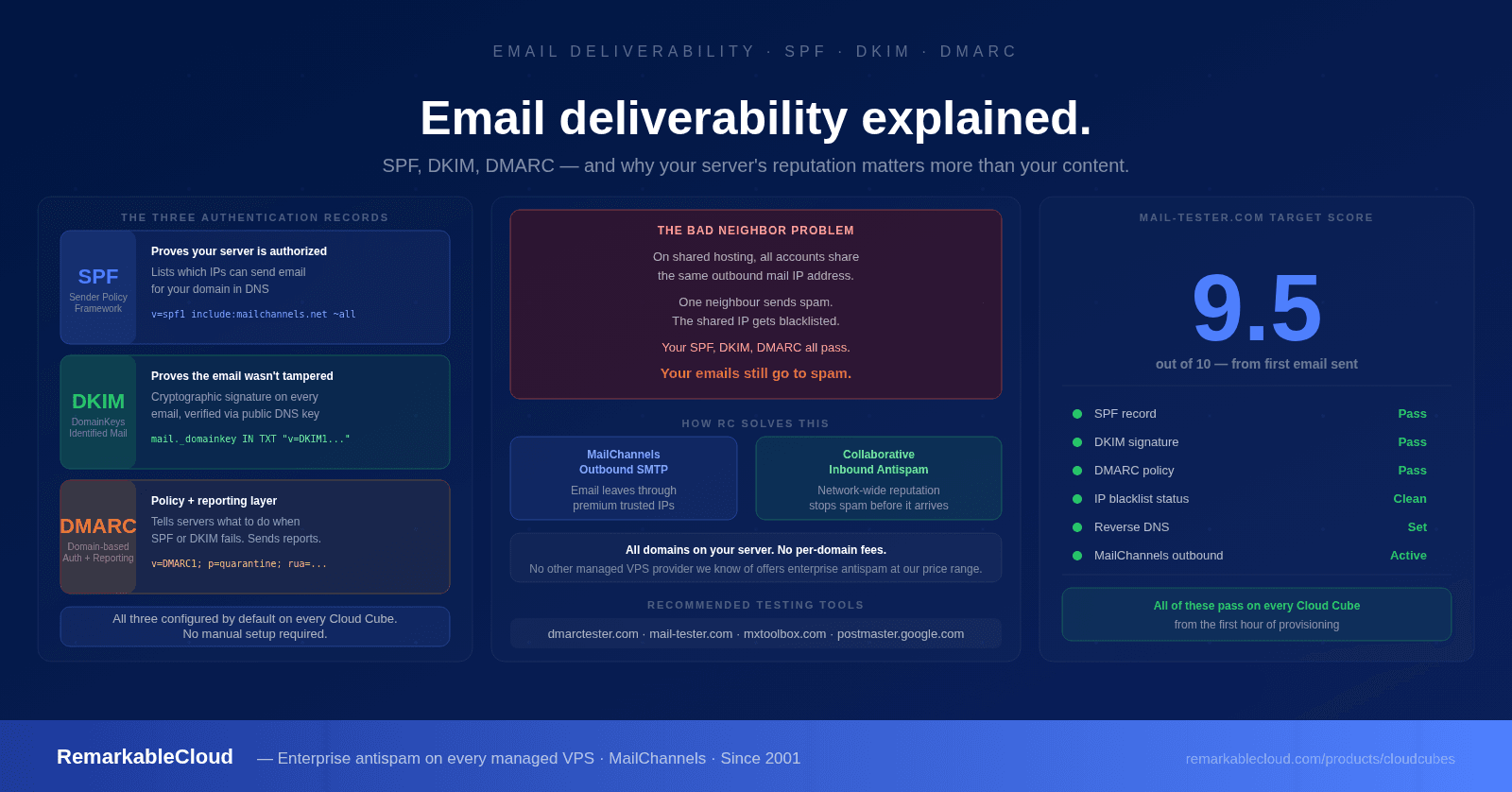
SPF is a DNS record on your domain that lists the IP addresses and mail servers authorized to send email on its behalf. When a receiving mail server gets an email from your domain, it checks your DNS for an SPF record and verifies whether the sending server's IP is on the approved list.
If the IP is not on the list, the email fails SPF. Depending on the receiving server's policy, it may be rejected outright, routed to spam, or flagged for further scrutiny.
A missing or misconfigured SPF record is one of the most common reasons legitimate email lands in spam. It does not mean your email is spammy: it means receiving servers cannot verify you are who you say you are.
DKIM uses cryptographic signatures to verify that an email was sent by an authorized server and that its content was not modified after sending. Your mail server signs outgoing emails with a private key. The corresponding public key is published in your DNS. When a receiving server gets the email, it retrieves your public key and verifies the signature.
If the signature is valid, the email is confirmed as authentic and unmodified. If the signature is missing or invalid, the email may be treated as suspicious or rejected.
DKIM is particularly important for transactional email. Order confirmations, password resets, and invoice emails that fail DKIM verification are significantly more likely to be routed to spam, or silently discarded before they reach the inbox.
DMARC builds on SPF and DKIM by giving domain owners control over what happens when authentication fails. It also adds reporting: receiving servers send you aggregate reports on who is sending email from your domain, including unauthorized senders.
A DMARC record specifies a policy with three possible actions when authentication fails:
- none: Take no action, just report. Used for monitoring.
- quarantine: Route failing emails to the spam folder.
- reject: Reject failing emails outright, before they reach the inbox.
DMARC without SPF and DKIM is meaningless: it has nothing to verify. The three records work as a system: SPF confirms the sending IP is authorized, DKIM confirms the message is authentic, and DMARC tells receiving servers what to do when either check fails and sends you reports so you know what is happening.
Why all three pass and your email still goes to spam
SPF, DKIM, and DMARC passing is necessary but not sufficient. The second major deliverability factor is IP reputation, and this is where many hosting environments create invisible problems their customers never trace back to the cause.
The bad neighbor problem
Every server on the internet has an IP address. Every IP address has a reputation built from the history of email sent from it. IP reputation databases, maintained by companies like Spamhaus, Barracuda, and major email providers: track which IPs have sent spam, generated complaints, or been associated with malicious activity.
On shared hosting, multiple businesses share the same outbound mail IP. If one of your neighbours sends a spam campaign, runs a compromised WordPress site that sends phishing emails, or has their account used by a bot: your outbound IP gets flagged. Your legitimate business emails are now being sent from a blacklisted IP. Your SPF, DKIM, and DMARC all pass. Your emails still go to spam or get blocked entirely.
You cannot see who your neighbours are. You cannot control what they send. You have no way to know your IP is blacklisted until customers start complaining that they are not receiving your order confirmations.
This is not an edge case. It is one of the most common and least understood causes of email deliverability problems for businesses on shared hosting environments.
Even on dedicated servers, IP range reputation matters. If other servers in the same IP subnet have a poor sending history, some receiving servers will apply reputation penalties to the entire range. This is why simply moving to any VPS does not automatically solve deliverability problems: the IP and the outbound mail infrastructure behind it both matter.
How RemarkableCloud handles email deliverability
Email deliverability is not an optional add-on or a premium feature at RemarkableCloud. It is part of the default configuration on every managed Cloud Cube, from the first day. Here is what that means in practice.
MailChannels SMTP gateway
All outbound email from your server routes through MailChannels, a dedicated commercial email delivery service used by major hosting providers worldwide. MailChannels maintains high sender reputation, handles delivery retries, and provides a clean sending IP that is not shared with your server neighbours. Your email goes out through infrastructure with a proven delivery record, not through your server's IP directly.
Collaborative antispam filtering
Inbound email passes through our antispam gateway before it reaches your mailbox. The system uses a collaborative reputation model: mail patterns and signals are evaluated across our entire network, so spam campaigns that target one customer are recognized and blocked for all. You benefit from collective intelligence without any configuration on your part.
SPF, DKIM, and DMARC configured by default
Every domain hosted on a Cloud Cube gets SPF, DKIM, and DMARC records configured correctly as part of the initial setup. You do not need to find the records, generate keys, or figure out the correct syntax. They are set up before you send your first email, which means authentication passes from day one rather than after you notice a deliverability problem.
All domains on your server, no per-domain fees
The antispam protection covers every domain and email account hosted on your Cloud Cube. Specialist antispam providers typically charge per domain or per account per month. We include both inbound and outbound protection for your entire server at no additional cost, regardless of how many domains you host.
How to verify your email deliverability setup
Good configuration should be verifiable. Here are the tools we recommend for checking SPF, DKIM, DMARC, and your IP reputation. All are free.
DMARC Tester: dmarctester.com
Our favorite tool for a complete deliverability check. Send a test email to a unique address the tool generates, and it visualizes in real time how a receiving mail server evaluates your SPF, DKIM, and DMARC records. You can see exactly which checks pass, which fail, and why, presented as a visual flow rather than raw DNS output. Also includes a DMARC quiz and an email header analyzer. dmarctester.com
MXToolbox: mxtoolbox.com
The most comprehensive DNS and email diagnostic tool. Check your SPF, DKIM, and DMARC records individually, look up your IP on major blacklists (Spamhaus, Barracuda, and others), test MX records, and diagnose SMTP connection issues. The blacklist check is particularly useful if you suspect an IP reputation problem. mxtoolbox.com
Mail-Tester: mail-tester.com
Sends your email through a scoring system and returns a 1-10 deliverability score with a detailed breakdown. Checks SPF, DKIM, DMARC, content quality, HTML markup, and blacklists in one report. Useful for a quick overall health check before sending a campaign or checking a new domain setup. mail-tester.com
Google Postmaster Tools: postmaster.google.com
If you send significant volume to Gmail addresses, Google Postmaster Tools shows your domain reputation and IP reputation as Gmail sees it, spam rates, and delivery error details. Requires domain verification. Essential for any business where Gmail is a significant portion of your recipient base. postmaster.google.com
What a clean email setup looks like
When email deliverability is configured correctly, a check at mail-tester.com should return a score of 9 or above. Here is what a well-configured server achieves on each dimension:
On a RemarkableCloud managed Cloud Cube, all of these pass out of the box. SPF, DKIM, and DMARC are configured during server provisioning. Outbound email routes through MailChannels with a clean IP reputation. Inbound filtering is active from day one.
You can run a mail-tester.com check within the first hour of your server being provisioned and expect a score above 9.5. If anything is off, our team resolves it: email infrastructure is part of what we manage, not an optional service you configure yourself.
Enterprise-grade email protection on every Cloud Cube. No extra cost. No configuration required. First month from $2.00.
See Cloud Cube plans →Email that arrives. Configured from day one.
SPF, DKIM, and DMARC by default. MailChannels outbound SMTP. Collaborative inbound antispam. All domains on your server, no per-domain fees. Managed since 2001.
See Cloud Cube plans