
Drupal CVE-2026-136716: last week's installer fix is not enough, update to 11.4.14
On this page
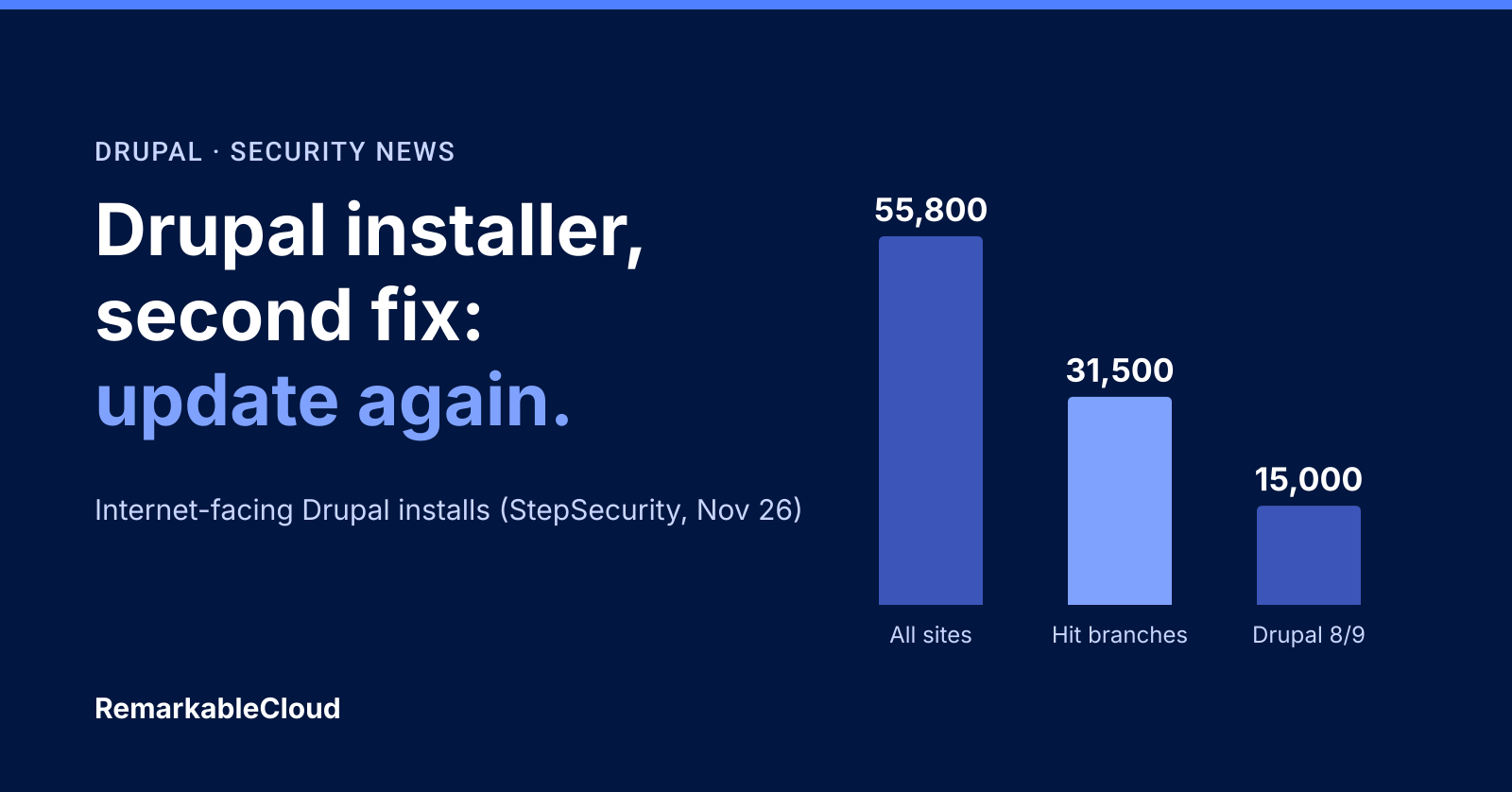
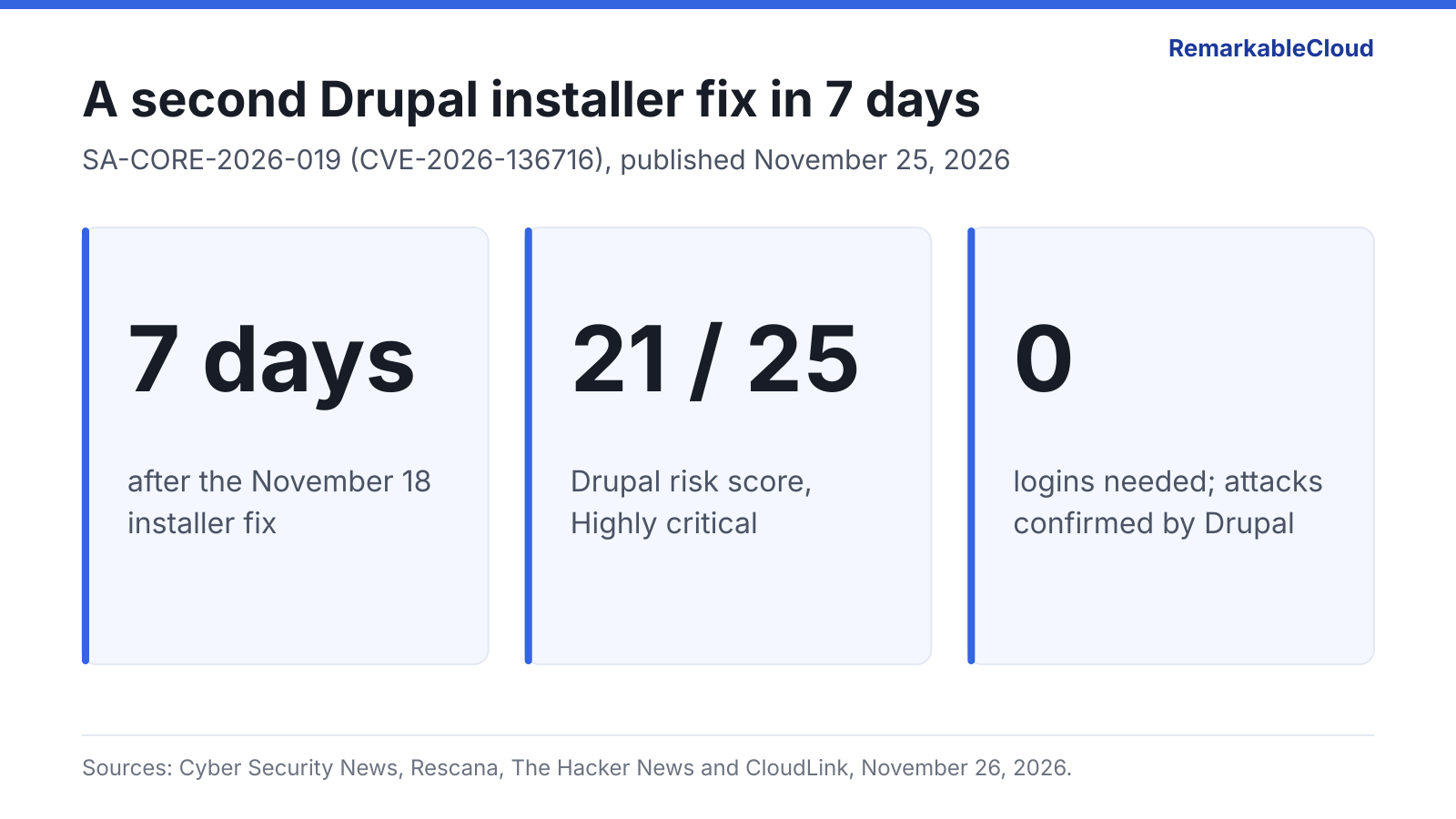
Drupal sites that installed last week’s installer fix still need another update: on November 25, 2026, Drupal published SA-CORE-2026-019 for CVE-2026-136716, a Highly critical access bypass (21 out of 25) that it says attackers are already using. Sites on 11.4.13, 11.3.22 or 10.6.22 should move to 11.4.14, 11.3.23 or 10.6.23 and run the database updates, because the new files alone do not complete the fix.
The new flaw sits in the same place as CVE-2026-132165, the installer flaw from November 18 that CISA added to its exploited list on November 24. That fix left a gap: some sites in unusual or incomplete install states, production sites included, could still be taken over.
This article covers what changed in 7 days, which versions are affected, how to check a site, and how to patch it, with the commands.
What changed since the November 18 fix?
| First advisory | Second advisory | |
|---|---|---|
| Advisory | SA-CORE-2026-017 | SA-CORE-2026-019 |
| CVE | CVE-2026-132165 | CVE-2026-136716 |
| Published | November 18, 2026 | November 25, 2026 |
| Type | Remote code execution through the installer | Access bypass leading to site takeover |
| Drupal risk score | 20 of 25, Highly critical | 21 of 25, Highly critical |
| Exploited | Yes, from November 19; in CISA KEV since November 24 | Yes, per Drupal; not in CISA KEV as of its November 25 release |
The November 25 advisory covers what The Hacker News calls “remaining vulnerable installation states” that attackers could still use after the first fix. Drupal’s description is short: the flaw is an improper check for unusual or exceptional conditions (CWE-754) that allows forceful browsing, which means reaching pages a site should not serve by requesting them directly.
Two details make this one awkward. The Drupal admin does not show whether a site is in the vulnerable state. And a site that was already taken over may no longer be in that state, so a clean-looking dashboard proves nothing. Drupal says sites that had already secured the installer are not affected, and The Hacker News quotes the warning that any site that left its installer reachable after the first fix may already have been compromised.
Drupal has confirmed the attacks but has not said when they started, how many sites were hit or who is behind them. None of the four reports we read adds those details.
Which Drupal versions are affected?
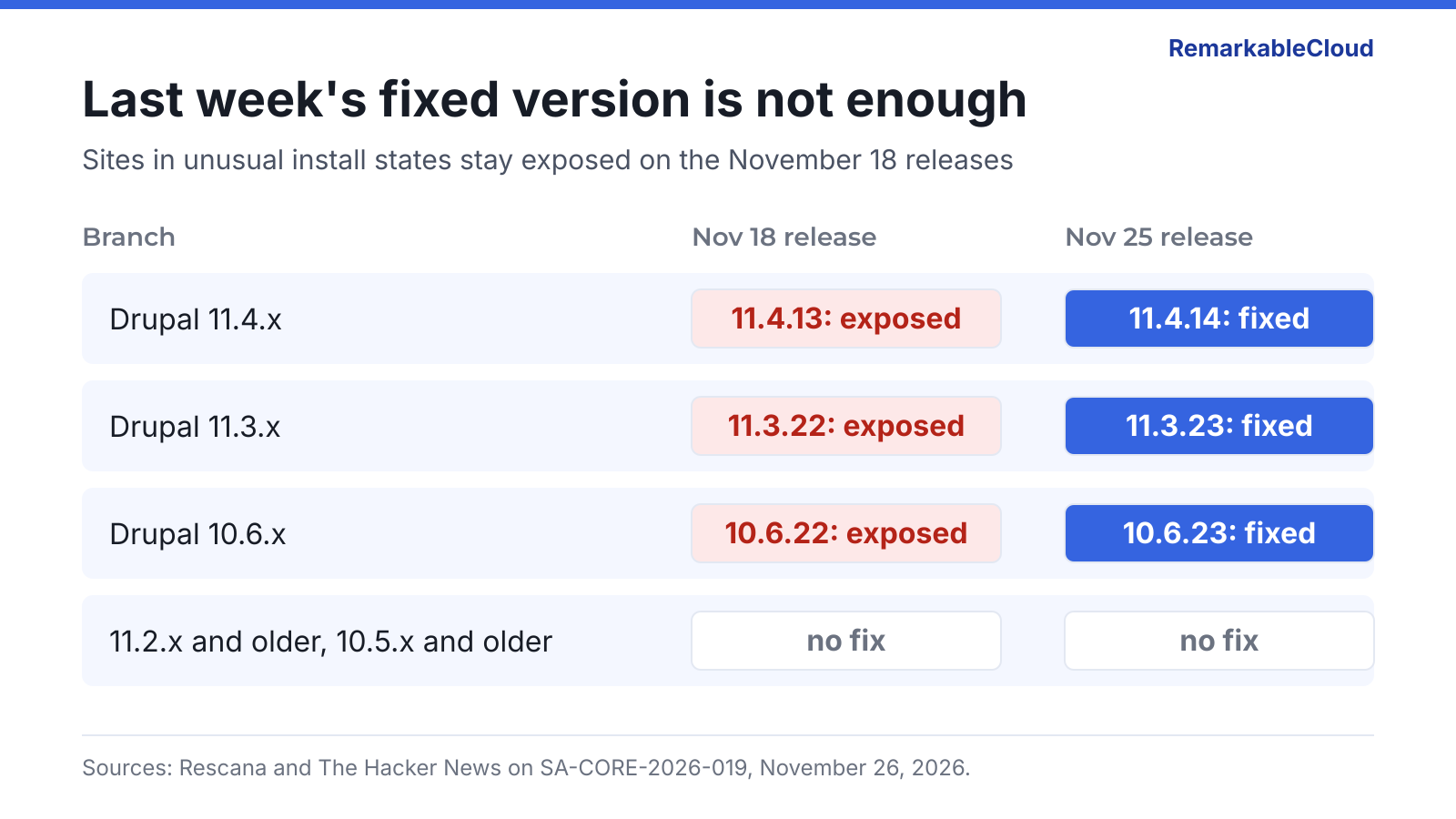
| Branch | November 18 release | November 25 release |
|---|---|---|
| Drupal 11.4.x | 11.4.13, still affected | 11.4.14, fixed |
| Drupal 11.3.x | 11.3.22, still affected | 11.3.23, fixed |
| Drupal 10.6.x | 10.6.22, still affected | 10.6.23, fixed |
| 11.2.x and older, 10.5.x and older, Drupal 8 and 9 | No fix, end of life | No fix, end of life |
Every release before 10.6.23, from 11.0.0 up to 11.3.22, and from 11.4.0 up to 11.4.13 is in the affected range of the CVE record, as Rescana reports it. Rescana also notes the coverage dates: 11.4.x gets security fixes until April 2027, while 11.3.x and 10.6.x get them only until December 2026, so a site on those two branches is updating to a short stop.
How many Drupal sites are exposed?
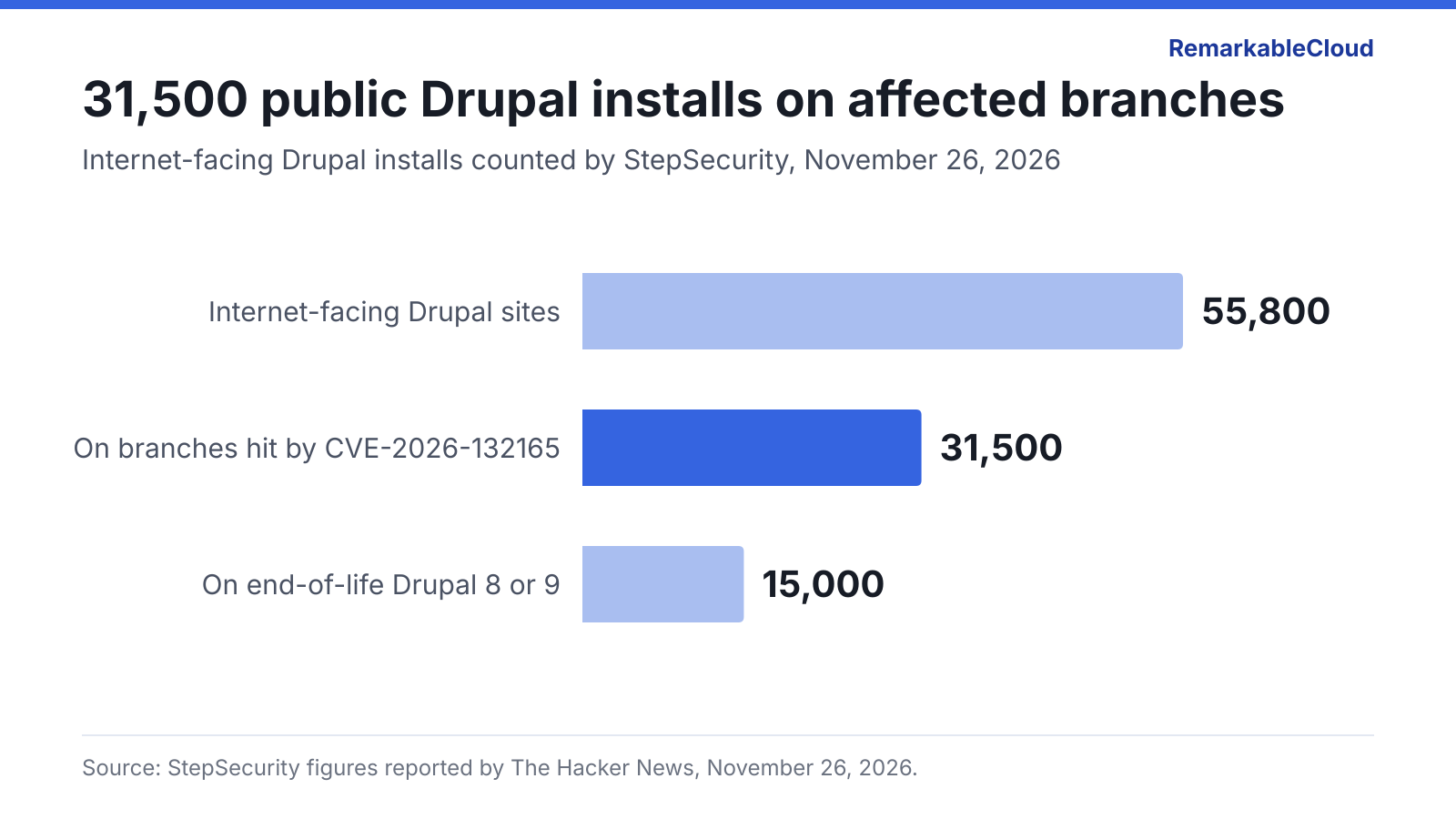
| StepSecurity count, November 26, 2026 | Installs |
|---|---|
| Internet-facing Drupal sites | about 55,800 |
| Running branches vulnerable to CVE-2026-132165 | 31,500 |
| On end-of-life Drupal 8 or 9 | about 15,000 |
These are StepSecurity’s figures as The Hacker News reported them. They count sites on affected branches, not sites in the unusual install state that CVE-2026-136716 needs, and no one has published that narrower number. Still, 31,500 is more than half of the 55,800, and the 15,000 on Drupal 8 or 9 can only protect themselves by blocking the installer or upgrading.
How do I check if my site is affected or was compromised?
Start with the core version, from the site’s root (often the folder that holds web/):
drush status --field=drupal-version
composer show drupal/core | grep versions
Anything below 11.4.14, 11.3.23 or 10.6.23 needs the update. Then confirm the installer is closed. Each request should return 403 or 404; a 200 means the installer answers:
curl -I https://example.com/core/install.php
curl -IL https://example.com/install.php
curl -I https://example.com/core/install.php/foo
Then look for signs of a break-in, since the admin interface will not tell you. Requests to the installer since November 18 from addresses you do not recognize are the first thing to look at (the log paths below are Debian and Ubuntu defaults; zgrep also reads the rotated, compressed files):
sudo zgrep -h "install\.php" /var/log/nginx/access.log* | less
sudo zgrep -h "install\.php" /var/log/apache2/access.log* | less
Drupal’s advisory points to user 1, the first administrator account. Check that its email address is yours and when it last changed, and list accounts created since November 18 (MySQL or MariaDB syntax):
drush sql:query "SELECT uid, name, mail, FROM_UNIXTIME(changed), FROM_UNIXTIME(login) FROM users_field_data WHERE uid = 1"
drush sql:query "SELECT uid, name, mail, FROM_UNIXTIME(created) FROM users_field_data WHERE created > UNIX_TIMESTAMP('2026-11-18')"
Rescana also suggests checking settings.php for database details you did not set and the web root and files folders for PHP files that should not be there. The public files folder should hold no PHP at all:
stat -c '%y %n' web/sites/default/settings.php
find web/sites/default/files -name "*.php"
If something looks wrong, keep a copy of the files and the database before changing anything, and follow Drupal’s “Your Drupal site got hacked. Now what?” guide.
How do I patch it?
1. Update core and run the database updates. On a Composer-managed site, take a backup or snapshot first. The database update step is part of the fix: Cyber Security News quotes Drupal that installing the new files alone is not enough.
composer update "drupal/core-*" --with-all-dependencies
drush updatedb
drush cache:rebuild
drush status --field=drupal-version
Without Drush, open /update.php in the browser after deploying the new code.
2. Keep the installer blocked in the web server. Sites that had already secured the installer are not affected by CVE-2026-136716, according to Drupal, so keep this rule in place after the update. For nginx, inside the HTTPS server block (Drupal’s guide says not to use an exact location = match):
location ^~ /core/install.php {
  return 404;
}
sudo nginx -t && sudo systemctl reload nginxFor Apache, the <Location> rule goes in the server or virtual host config, not in .htaccess; we covered it, and the .htaccess alternative for shared hosting, in our article on the first installer flaw. Blocking install.php does not affect update.php or Drush.
3. Secure user 1. Confirm its email address is yours, and set a new password. Replace admin with the user 1 name the query above returned:
drush user:password admin "<a new long password>"4. Run the curl checks again, on every hostname the site answers to.
How this works on a RemarkableCloud server
Every server we sell is fully managed at no extra cost, and we configure and support everything we install on it. For a flaw like this one, our agents detect newly reported vulnerabilities, measure which servers are actually exposed, put preventive measures in place before a patch exists, and roll out patches after testing them on a dev box and on canary servers. The managed firewall and IDS run on centralized log analysis and live threat data, and every server takes a daily snapshot, with extra snapshots free before a change.
Updating Drupal core touches your site’s code and database, so we do it with you. If you run Drupal on one of our servers and want help checking the version, reviewing the logs, updating core or blocking the installer, open a ticket. For how quickly new flaws get used, read how fast attackers exploit new vulnerabilities, or see what our managed VPS includes.
Methodology
- Flaw, versions and score: Drupal’s advisory SA-CORE-2026-019 as reported on November 26, 2026 by Rescana (which quotes the CVE record and the advisory’s score and vector), Cyber Security News, The Hacker News and CloudLink. We could not load drupal.org’s own advisory pages during this run, so every Drupal statement here is as those four reports give it; they agree on the advisory number, the date, the fixed versions, the 21 of 25 score and the exploitation statement.
- Exploitation: Drupal’s advisory is the only first-hand report, and it gives no start date, victim count or attribution. The CISA status comes from Rescana’s check of the catalog release of November 25, 2026.
- Install base: StepSecurity’s counts of internet-facing Drupal installs as of November 26, 2026, as published by The Hacker News. We did not see StepSecurity’s method; the counts cover affected branches, not the narrower install state this flaw needs.
- Commands: the installer rules come from Drupal’s “Securing the installer” guide; the log, version, user and file checks use standard Drush, Composer, curl and coreutils commands, with the steps taken from the advisory as reported (user 1, update.php) and from Rescana’s response guidance (settings.php, stray PHP files).
Questions and answers
What is CVE-2026-136716?
An access bypass in Drupal core's installer, fixed in advisory SA-CORE-2026-019 on November 25, 2026. Some sites in unusual or incomplete install states, production sites included, could still be taken over after the November 18 installer fix. Drupal rates it Highly critical, 21 out of 25, and says it is being exploited.
My site is on Drupal 11.4.13. Am I safe?
Not necessarily. 11.4.13, 11.3.22 and 10.6.22 fixed CVE-2026-132165 but not CVE-2026-136716. Update to 11.4.14, 11.3.23 or 10.6.23 and run the database updates (update.php or drush updatedb), because copying in the new files alone does not complete the fix.
Is CVE-2026-136716 being exploited?
Yes. Drupal's advisory says it is being exploited in the wild, without a date, a site count or an attacker name. As of CISA's November 25, 2026 catalog release it was not in the Known Exploited Vulnerabilities list; the earlier installer flaw, CVE-2026-132165, is.
How do I know if my Drupal site was compromised?
The Drupal admin does not show whether a site is in the vulnerable state, and a site that was already taken over may no longer be in it. Check web server logs for requests to install.php since November 18, look for changes to or by user 1, confirm user 1's email address is yours, and consider resetting its password.
Is there a fix for Drupal 8, 9, 10.5 or 11.2?
No. Those branches are end of life and get no fix. Block install.php in the web server today and plan the move to 10.6.23, 11.3.23 or 11.4.14.
Sources and references
- The Hacker News, Drupal warns of new Highly critical site takeover vulnerability under active exploitation (November 26, 2026) · thehackernews.com
- Rescana, Drupal core CVE-2026-136716 exploited: site takeover in unusual install states (November 26, 2026) · rescana.com
- Cyber Security News, Drupal warns of active attacks exploiting new critical website takeover vulnerability (November 26, 2026) · cybersecuritynews.com
- CloudLink, attackers exploit gap in Drupal installer patch, CVE-2026-136716 (November 26, 2026) · cloudlinktech.com
- Drupal, securing the installer (install.php) · drupal.org