
31.5% of WordPress sites run PHP that no longer gets security fixes
On this page
- 31.5% of WordPress sites, by version
- Every PHP release now gets four years
- PHP 8 took over, but PHP 7 and 5 remain
- Developers upgrade. Deployed sites lag.
- Why it matters for your site
- Check and upgrade your PHP version
- How this works on a RemarkableCloud server
- Methodology
- Questions and answers
- Sources and references
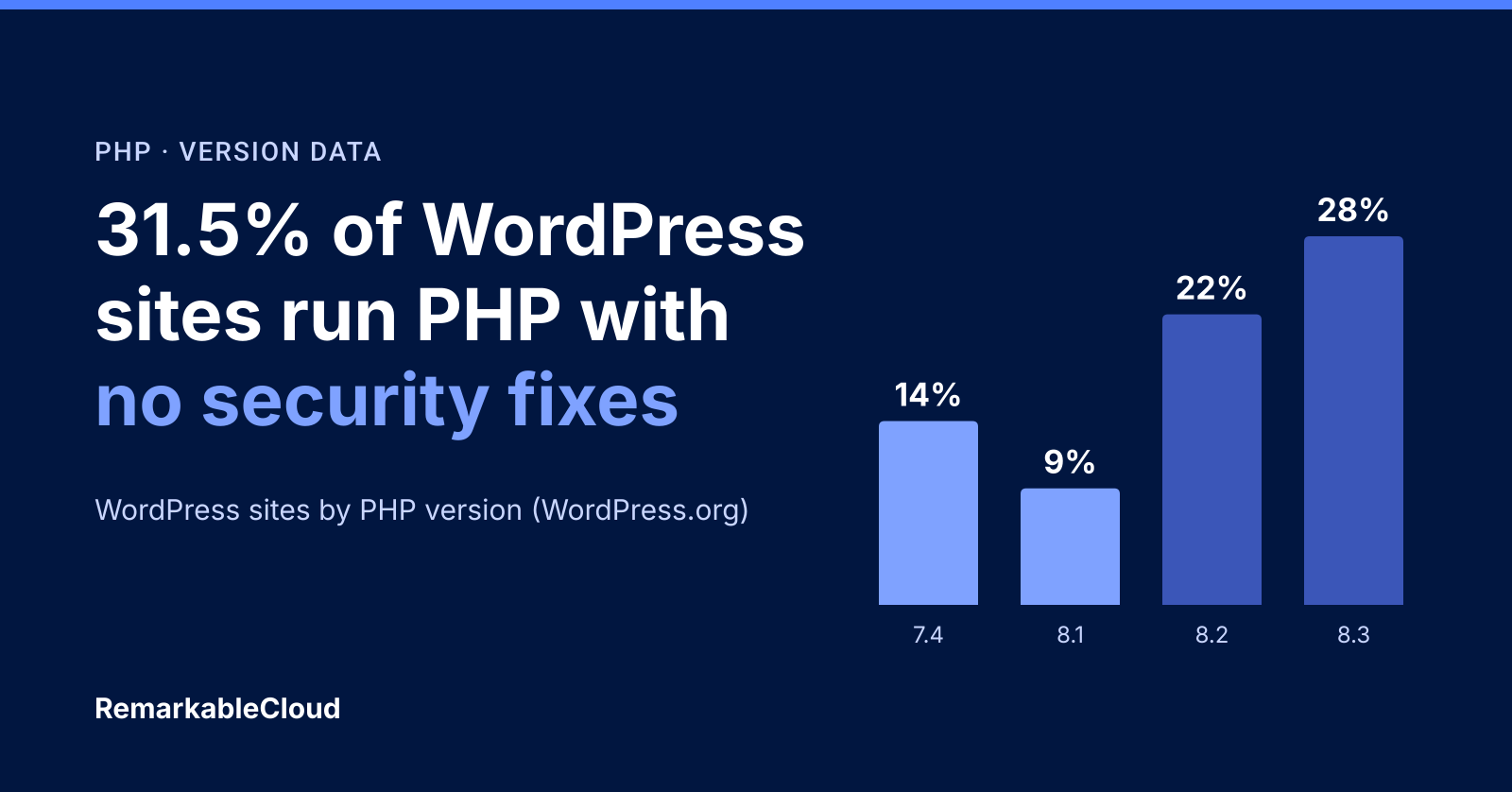
PHP 8.6 came out on November 19, 2026. Meanwhile, according to WordPress.org’s own statistics, 31.5% of WordPress sites run a PHP version that the PHP project no longer patches at all. The single most common unsupported version is PHP 7.4, on 14.1% of sites, four years after its last security release.
The number is about to jump. PHP 8.2 stops getting security fixes on December 31, 2026. It runs 22.2% of WordPress sites today. If nobody upgrades, 53.7% of WordPress sites will be on unsupported PHP on January 1.
31.5% of WordPress sites, by version
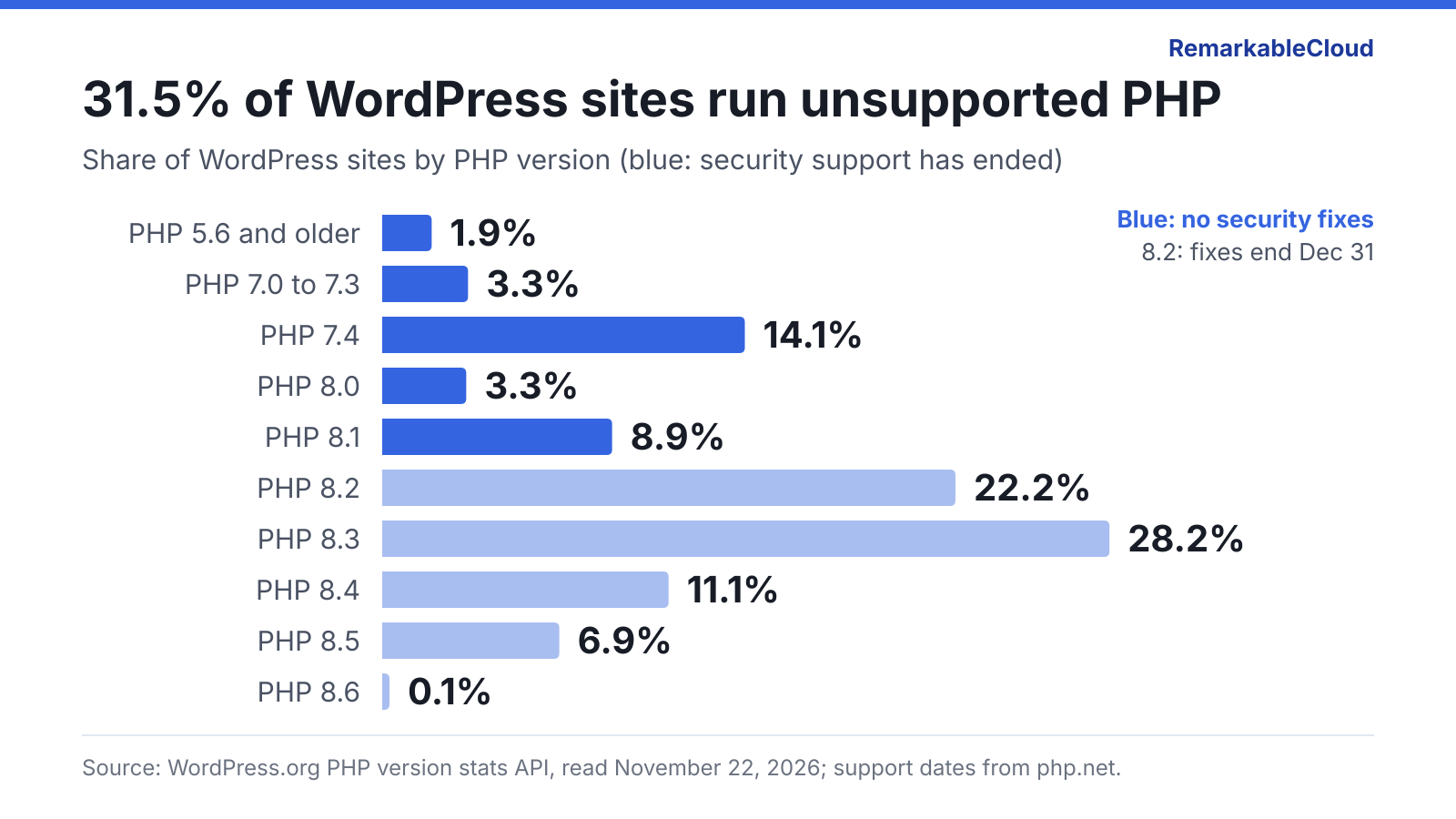
| PHP version | Share of WordPress sites | Security fixes |
|---|---|---|
| 5.6 and older | 1.9% | Ended (5.6: December 31, 2018) |
| 7.0 to 7.3 | 3.3% | Ended (7.3: December 6, 2021) |
| 7.4 | 14.1% | Ended November 28, 2022 |
| 8.0 | 3.3% | Ended November 26, 2023 |
| 8.1 | 8.9% | Ended December 31, 2025 |
| 8.2 | 22.2% | Until December 31, 2026 |
| 8.3 | 28.2% | Until December 31, 2027 |
| 8.4 | 11.1% | Until December 31, 2028 |
| 8.5 | 6.9% | Until December 31, 2029 |
| 8.6 | 0.1% | Until December 31, 2030 |
Add up every version whose security support has ended (8.1 and older) and you get 31.5%. PHP 8.3 is now the most common version, which is good news: it is also the version WordPress recommends.
WordPress itself still accepts old PHP. WordPress 7.0, released in April 2026, raised the minimum from PHP 7.2.24 to 7.4.0, and the WordPress requirements page says the software “will still run on PHP 7.4+” while noting that those versions have reached official end of life. WordPress raises its minimum only when an old version falls below 5% of sites, so the 14.1% on PHP 7.4 keeps that floor where it is.
That compatibility is convenient, and it is also why so many sites never move. The site keeps working, so nobody notices the runtime underneath stopped getting fixes.
Every PHP release now gets four years
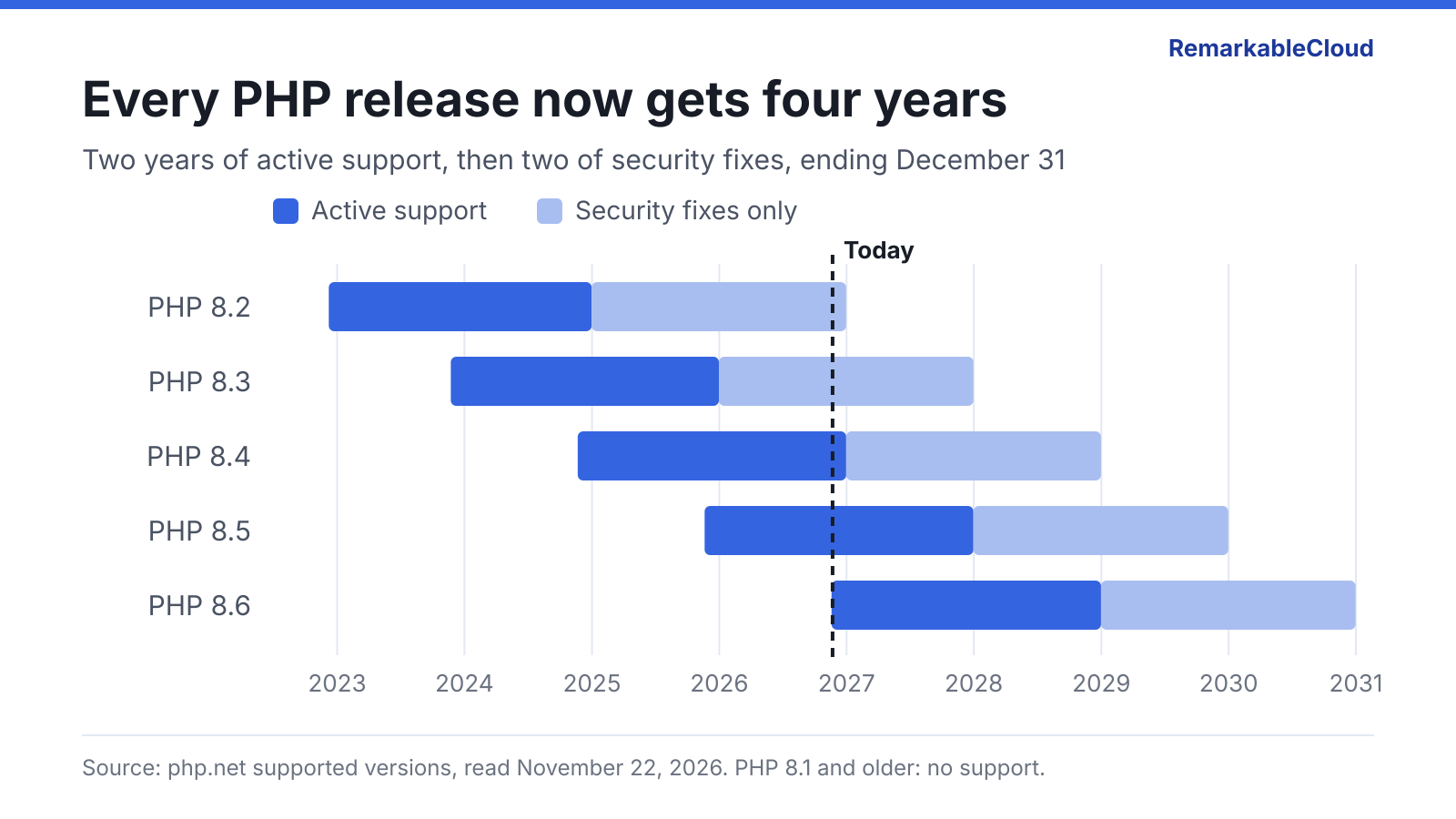
| Version | Released | Active support until | Security fixes until |
|---|---|---|---|
| 8.2 | December 8, 2022 | December 31, 2024 | December 31, 2026 |
| 8.3 | November 23, 2023 | December 31, 2025 | December 31, 2027 |
| 8.4 | November 21, 2024 | December 31, 2026 | December 31, 2028 |
| 8.5 | November 20, 2025 | December 31, 2027 | December 31, 2029 |
| 8.6 | November 19, 2026 | December 31, 2028 | December 31, 2030 |
The PHP project changed its release policy in 2024. Under the accepted “Release cycle update” RFC, each version is “fully supported for two years” and then gets “two additional years for critical security issues only”. Both changes, extending security support by a year and lining end dates up on December 31, passed unanimously (31 to 0 and 33 to 0). PHP 8.1 got the extra year too, which is why it reached end of life on December 31, 2025.
So the calendar is now predictable. A new PHP version ships late each year, and one version loses security support every December 31. If you upgrade once every two years to the newest version, you are never on an unsupported one.
PHP 8 took over, but PHP 7 and 5 remain
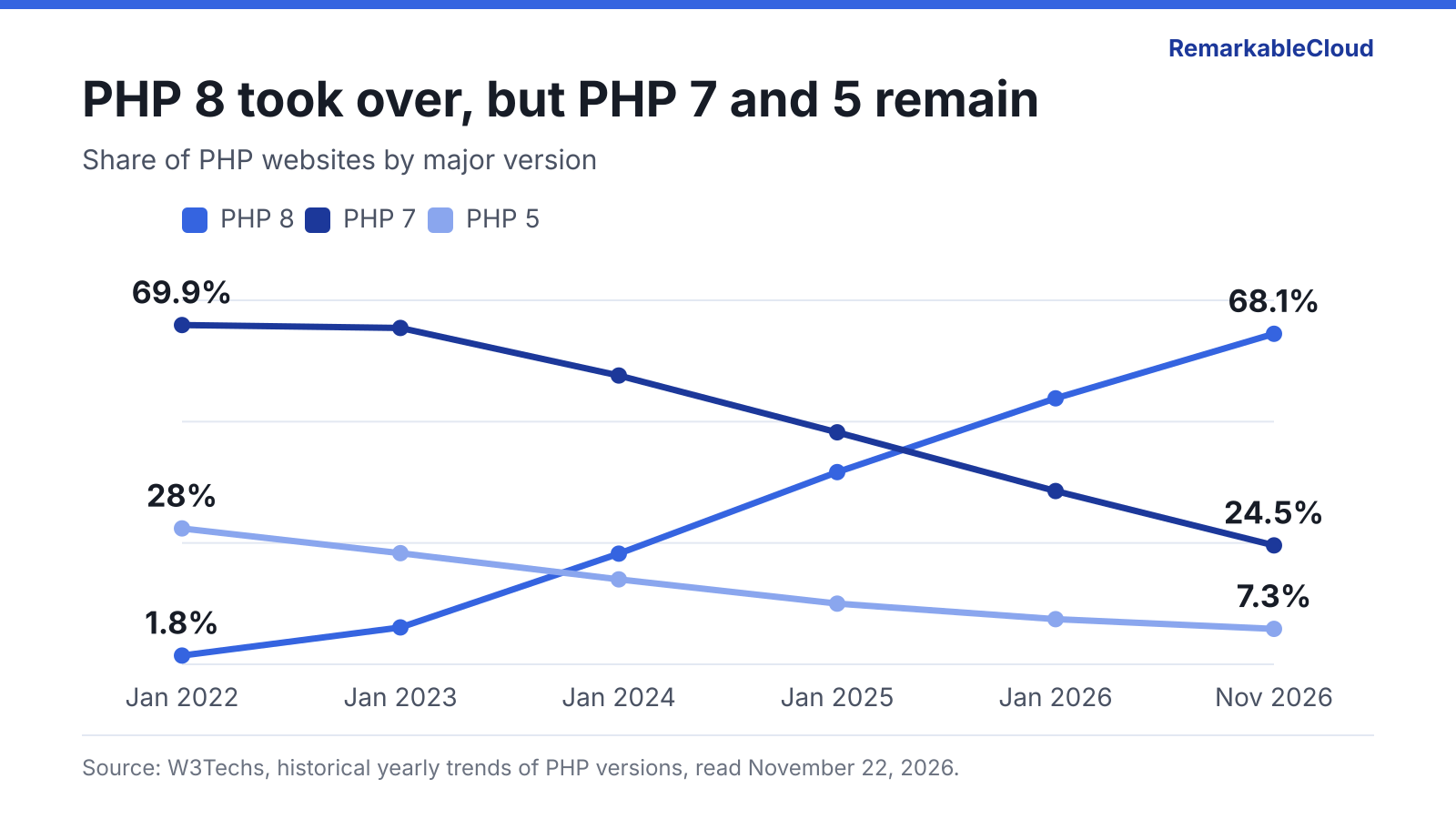
| Date | PHP 8 | PHP 7 | PHP 5 |
|---|---|---|---|
| January 2022 | 1.8% | 69.9% | 28.0% |
| January 2023 | 7.6% | 69.3% | 22.9% |
| January 2024 | 22.8% | 59.5% | 17.5% |
| January 2025 | 39.6% | 47.8% | 12.5% |
| January 2026 | 54.8% | 35.7% | 9.3% |
| November 2026 | 68.1% | 24.5% | 7.3% |
W3Techs looks at all websites, not just WordPress. PHP 8 passed PHP 7 during 2025 and now runs 68.1% of PHP sites. But every PHP 7 and PHP 5 version is out of support, and together they still account for 31.9% of PHP websites. PHP 5, which received its last security fix at the end of 2018, is on 7.3%.
Developers upgrade. Deployed sites lag.
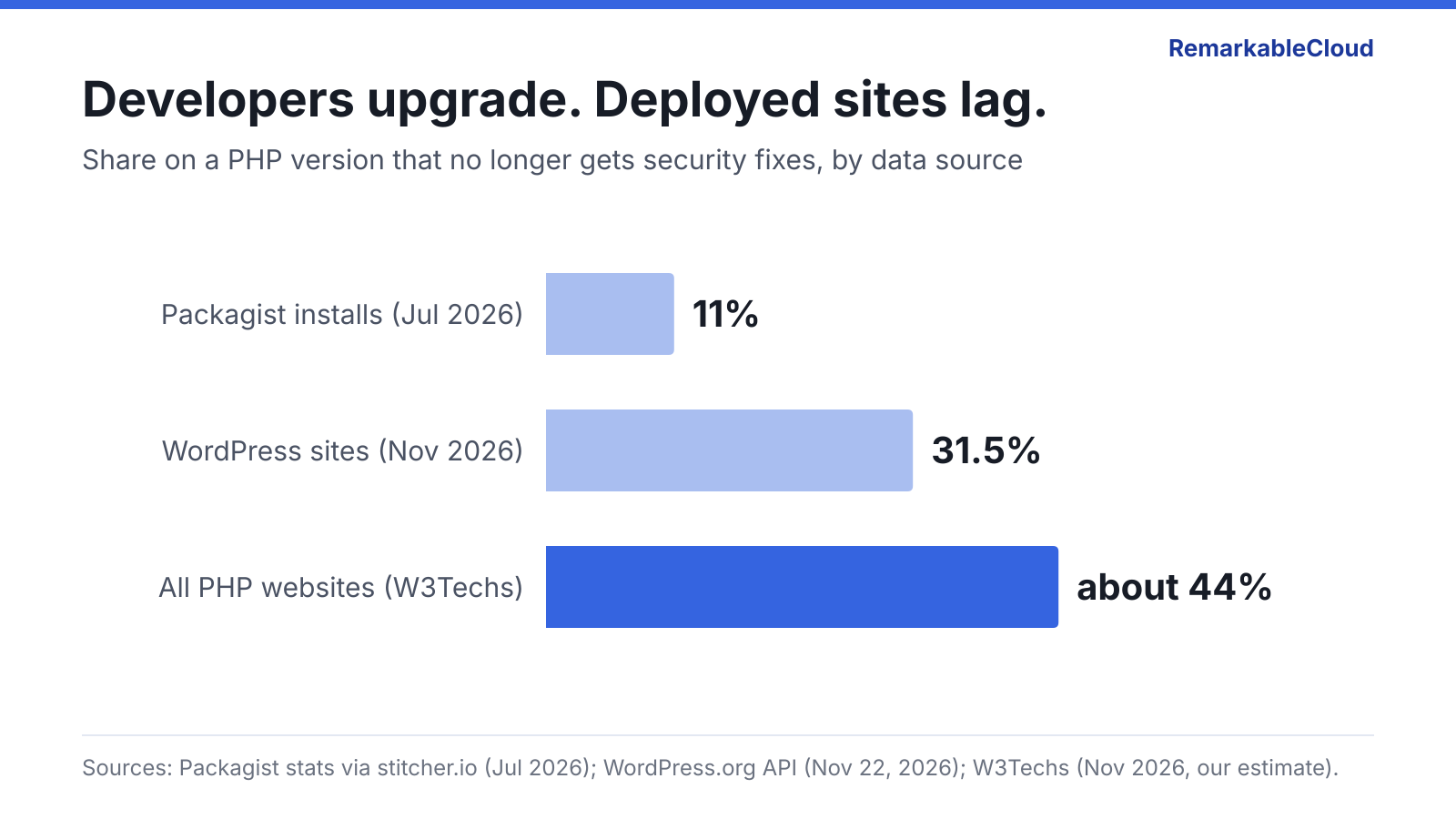
| Data source | What it measures | On unsupported PHP |
|---|---|---|
| Packagist (July 2026) | PHP versions installing Composer packages | 11% |
| WordPress.org (November 2026) | WordPress sites | 31.5% |
| W3Techs (November 2026) | All websites using PHP | About 44% (estimate) |
The three data sets measure different things, and the gap between them is the story. Packagist counts the PHP versions used when developers install Composer packages, which mostly means active development and build pipelines. There, only 11% ran PHP 7.4, 8.0 or 8.1 in July 2026, and PHP 8.4 was the most used version at 32%.
WordPress sites lag further, and the web as a whole lags most. The W3Techs estimate is ours: 31.9% on PHP 7 or older, plus the PHP 8.0 and 8.1 share of PHP 8 sites, which comes to about 44%. Sites get built, launched and then left alone. The code keeps running long after anyone looks at the server.
Why it matters for your site
When a PHP version reaches end of life, the PHP project stops releasing fixes for it, including for security flaws found later. Any new vulnerability in that version stays open. Some Linux distributions and commercial vendors patch older PHP builds on their own, so not every old install is unpatched, but you need to know that your vendor does this rather than assume it.
There is also a performance and compatibility cost. Plugin and theme developers test against current versions, and Composer packages raise their minimums: in Packagist’s July 2026 data, only 352 out of 1,000 packages required a minimum PHP version that still receives security updates. Staying on an old version eventually means you cannot install the update that fixes your next plugin vulnerability.
Check and upgrade your PHP version
1. Check what the web server actually runs. In WordPress, go to Tools, then Site Health, then Info, and open the Server section. The command line can run a different PHP than your website does, so use the dashboard or a phpinfo page as the source of truth.
2. Check the command-line PHP and WP-CLI.
php -v
wp cli info
WP-CLI’s documentation notes that the php.ini it reports “is typically different from the web server’s”.
3. On Debian or Ubuntu, see which PHP packages are installed.
dpkg -l | grep php4. Take a snapshot before you change anything. A PHP upgrade can break an old plugin. With a snapshot, a bad upgrade is a restore, not a rebuild.
5. Install the new version and switch Apache to it (PHP-FPM example). Install the same extensions your site uses on the old version, with the new version number.
sudo apt install php8.3-fpm php8.3-mysql php8.3-xml php8.3-mbstring php8.3-curl php8.3-zip php8.3-gd
sudo a2disconf php8.2-fpm
sudo a2enconf php8.3-fpm
sudo systemctl restart php8.3-fpm apache2
If apt can’t find the version you want, your distribution doesn’t package it; check how your distribution provides newer PHP before adding any third-party repository. On nginx, point the fastcgi_pass socket in your site’s config to the new version’s socket instead, then reload nginx.
6. Switch the command-line default too.
sudo update-alternatives --set php /usr/bin/php8.37. Test, then remove the old version. Load the pages that matter (home, checkout, contact form, login), watch the PHP error log, and only then remove the old packages. If you use a control panel, most of this is a dropdown in the panel’s PHP settings.
How this works on a RemarkableCloud server
Every server we sell is fully managed at no extra cost. Our agents watch for newly reported vulnerabilities in the software stack, check which servers are actually exposed, put preventive measures in place before a patch exists, and roll out patches after testing them on a dev box and on canary servers.
Choosing the PHP version for a site is a decision about your code, so we make it with you. If your site is still on PHP 8.1 or older, or on 8.2 with the December 31 deadline coming, open a ticket and our team will go through the upgrade with you. Every server has an automatic daily snapshot, and you can take extra snapshots for free before any change.
If you run WordPress for yourself or for clients, see how our managed WordPress hosting works. For the bigger picture on patching speed, read how fast attackers exploit new flaws.
Methodology
- WordPress PHP shares: WordPress.org PHP version statistics API, read on November 22, 2026. The API carries no date of its own. “Unsupported” means the PHP project’s security support has ended as of November 22, 2026 (PHP 8.1 and older). The 53.7% figure adds PHP 8.2’s current share and assumes no one upgrades before January 1, 2027.
- Support dates: php.net supported versions and end-of-life pages, read on November 22, 2026, and the “Release cycle update” RFC (accepted 2024).
- W3Techs: historical yearly trends by PHP major version (values on January 1 of each year, plus November 20, 2026). The “about 44%” is our estimate: PHP 7, 5 and 4 shares (31.9%) plus PHP 8.0 and 8.1, which W3Techs reports as 18.4% of PHP 8 sites (16 November 2026), times PHP 8’s 68.1% share. It mixes two dates four days apart, so treat it as approximate.
- Packagist: Brent Roose’s PHP version stats for July 2026, based on Packagist download data. The shares shown add up to 97%; versions older than 7.4 are not listed.
- WordPress requirements: WordPress.org requirements page and the Make WordPress Core posts of January 9, 2026 and May 22, 2026.
Questions and answers
How many WordPress sites run unsupported PHP?
31.5%, according to WordPress.org's statistics. The most common unsupported version is PHP 7.4, on 14.1% of sites.
When does PHP 8.2 reach end of life?
PHP 8.2 stops getting security fixes on December 31, 2026. It runs 22.2% of WordPress sites, so without upgrades 53.7% of WordPress sites will be on unsupported PHP on January 1, 2027.
How long is a PHP version supported?
Four years: two years of full support, then two years of security fixes only. Support now ends on December 31 of the final year.
How do I check which PHP version my site runs?
In WordPress, open Tools, Site Health, Info and the Server section. The command line can run a different PHP than the website, so treat the dashboard or a phpinfo page as the source of truth.
Does WordPress still run on PHP 7.4?
Yes. WordPress 7.0 raised the minimum to PHP 7.4.0, but PHP 7.4 has had no security fixes for four years, so any new flaw in it stays open.
Sources and references
- WordPress.org PHP stats API · api.wordpress.org
- php.net supported versions · php.net
- php.net unsupported branches · php.net
- PHP RFC: Release cycle update · wiki.php.net
- W3Techs PHP version history · w3techs.com
- stitcher.io PHP version stats, July 2026 · stitcher.io
- WordPress requirements · wordpress.org
- Dropping support for PHP 7.2 and 7.3 · make.wordpress.org
- PHP support clarification 2026 · make.wordpress.org
- WP-CLI cli info · developer.wordpress.org