
Gmail, Yahoo and Microsoft sender rules: why your mail lands in spam
On this page
- Three numbers that decide where your mail lands
- What each provider requires
- What happens when you miss them
- Half of popular domains now publish DMARC
- Publishing DMARC is not the same as enforcing it
- Check your domain in five minutes
- How this works on a RemarkableCloud server
- Methodology
- Questions and answers
- Sources and references
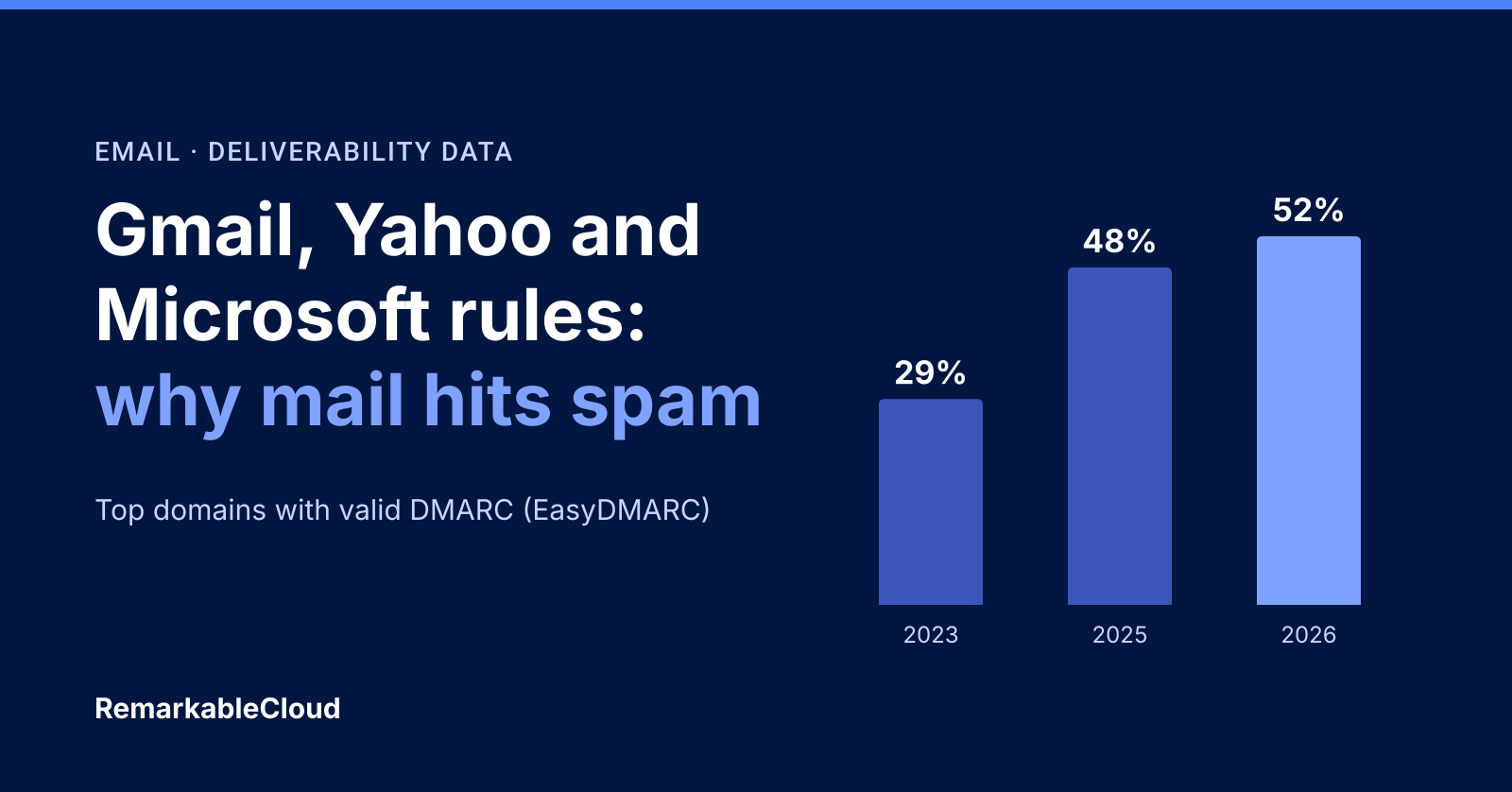
If your order confirmations, password resets or newsletter started landing in spam, the cause is usually not your content. Since February 2024, the three biggest mailbox providers have been checking who you are before they read what you wrote. Gmail, Yahoo and Outlook.com now require senders to prove their domain with SPF, DKIM and DMARC, keep complaints low, and let people unsubscribe in one click. Since November 2025, Gmail has been turning missed requirements into outright rejections.
Here is what each provider requires, how far the rest of the internet has gotten, and the checks you can run on your own domain in a few minutes.
Three numbers that decide where your mail lands
| Threshold | Value | What it means |
|---|---|---|
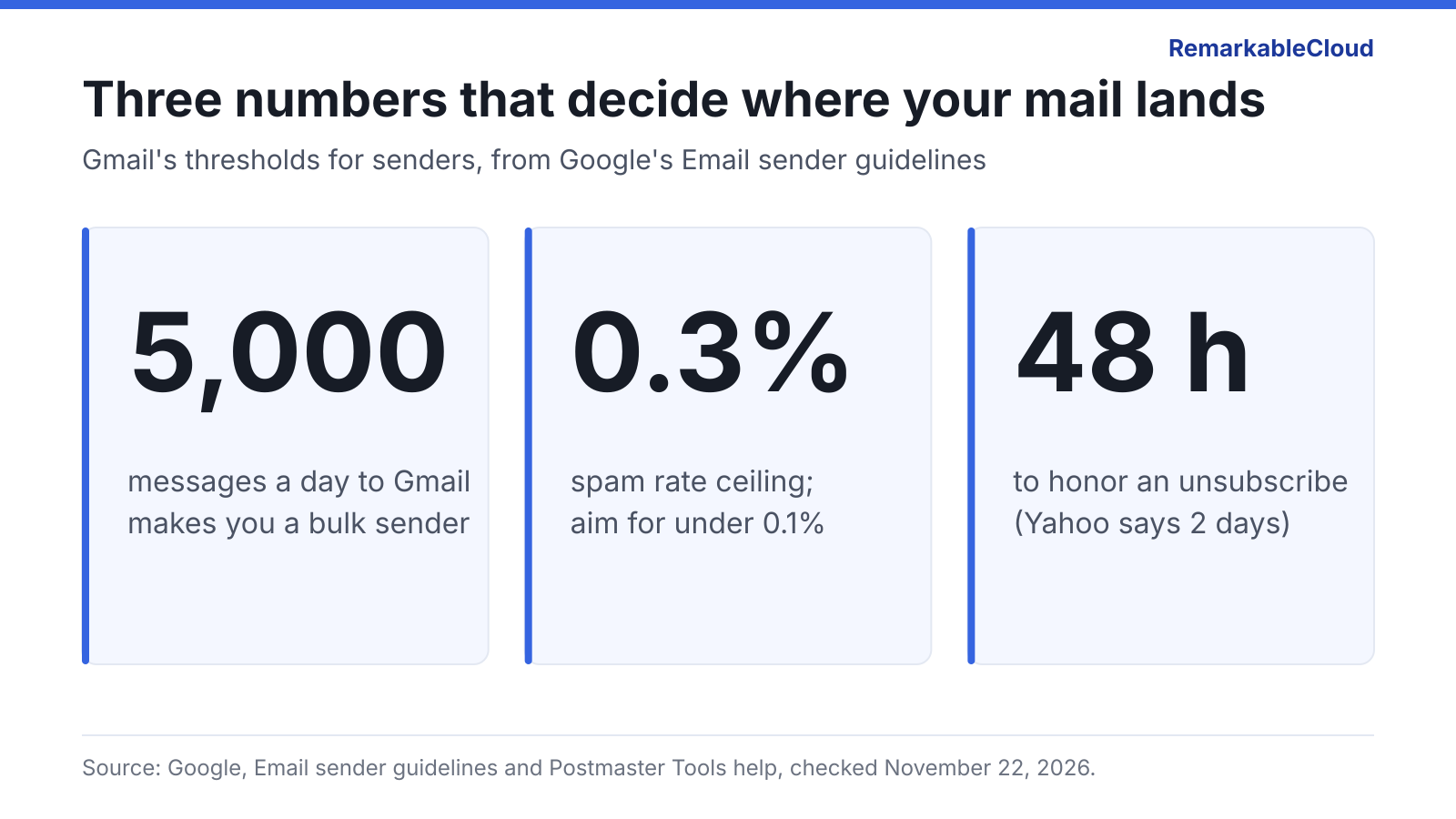
| Bulk sender volume (Gmail) | About 5,000 messages a day | Counted across your primary domain, to personal Gmail accounts |
| Spam rate ceiling | 0.3% | Google asks you to stay under 0.1% |
| Unsubscribe deadline | 48 hours (Yahoo: 2 days) | From the moment someone clicks unsubscribe |
5,000 a day, once, is enough. Google counts messages sent to personal Gmail accounts from your primary domain in a 24-hour period. Cross roughly 5,000 once and Google treats you as a bulk sender permanently. A store that sends a big holiday campaign in December is a bulk sender in March too. Subdomains count toward the parent domain.
0.3% is the ceiling, 0.1% is the target. Google wants the spam rate reported in Postmaster Tools kept below 0.1% and never at 0.3% or higher. If you cross 0.3%, you lose eligibility for Google’s mitigation help until your rate stays under it for seven days in a row. For a list of 10,000 people, 0.3% is 30 spam clicks.
48 hours to honor an unsubscribe. Marketing and subscribed mail must carry a one-click unsubscribe header and a visible unsubscribe link in the body. Google’s Postmaster Tools checks that unsubscribes are processed within 48 hours; Yahoo’s guidance says two days.
What each provider requires
| Requirement | Gmail | Yahoo | Outlook.com |
|---|---|---|---|
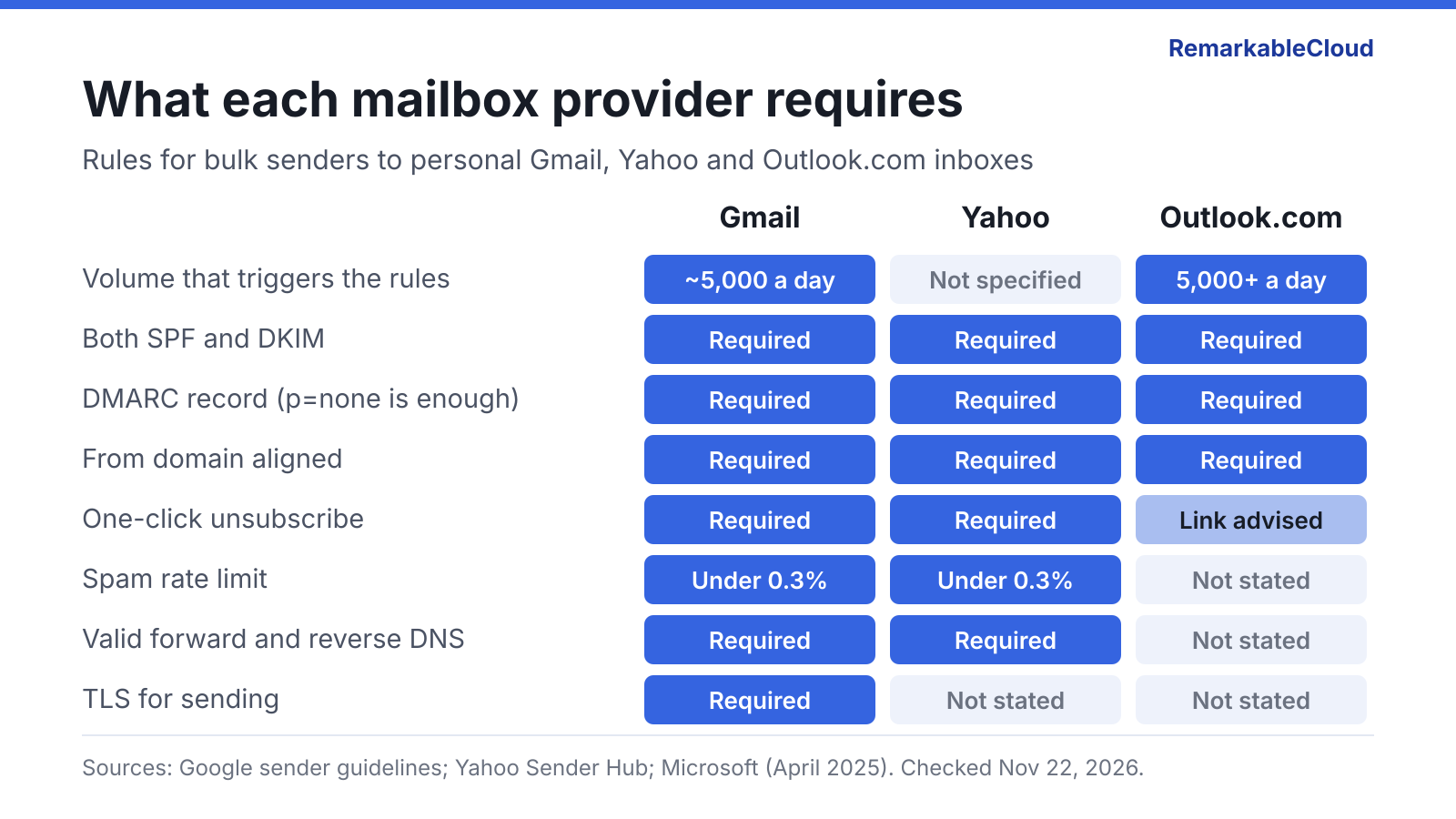
| Volume that triggers the rules | About 5,000 a day | Not specified | More than 5,000 a day |
| Both SPF and DKIM | Required | Required | Required |
| DMARC record (p=none is enough) | Required | Required | Required |
| From domain aligned with SPF or DKIM | Required | Required | Required |
| One-click unsubscribe | Required | Required | Working unsubscribe link advised |
| Spam rate limit | Under 0.3% | Under 0.3% | Not stated |
| Valid forward and reverse DNS | Required | Required | Not stated |
| TLS for sending | Required | Not stated | Not stated |
The three rule sets agree on the core. Every bulk sender needs SPF and DKIM both passing, a published DMARC record, and a From address whose domain matches the domain that SPF or DKIM authenticated (that match is called alignment). A DMARC policy of p=none meets the minimum for all three; you do not have to start by rejecting mail.
The differences are at the edges. Yahoo deliberately publishes no volume threshold, so it expects good practice from everyone. Microsoft’s rules for Outlook.com, Hotmail and Live addresses took effect on May 5, 2025, and recommend a working unsubscribe link rather than requiring the one-click header. Gmail is the strictest on infrastructure: it requires TLS and a reverse DNS record (PTR) for your sending IP whose hostname resolves back to the same IP.
Even below 5,000 messages a day, Google requires every sender to have SPF or DKIM, valid forward and reverse DNS, TLS, and a spam rate under 0.3%. Small senders are not exempt; they just have a shorter list.
What happens when you miss them
Mail that fails no longer just drifts into spam. Google added a note in November 2025 that it is ramping up enforcement with temporary and then permanent rejections. Its published SMTP error codes show which check failed:
| Code | What failed |
|---|---|
| 5.7.26 | Message is unauthenticated (no passing SPF or DKIM) |
| 5.7.27 | SPF |
| 5.7.30 | DKIM |
| 5.7.25 | Reverse DNS (PTR) for the sending IP |
| 5.7.29 | TLS |
| 4.7.27, 4.7.29, 4.7.30, 4.7.32 | Temporary rate limiting for the same failures |
Microsoft’s rejection reads: “550; 5.7.515 Access denied, sending domain [SendingDomain] does not meet the required authentication level.” Yahoo says non-compliant mail may be sent to spam or rejected with a specific error code.
If your server’s mail log shows any of these, the bounce is telling you exactly which DNS record or setting to fix.
Google says the earlier, lighter version of these rules worked: after it required authentication in 2022, unauthenticated messages to Gmail users fell by 75%, according to its October 2023 announcement of the current rules.
Half of popular domains now publish DMARC
| Year | Top 1.8M domains with valid DMARC |
|---|---|
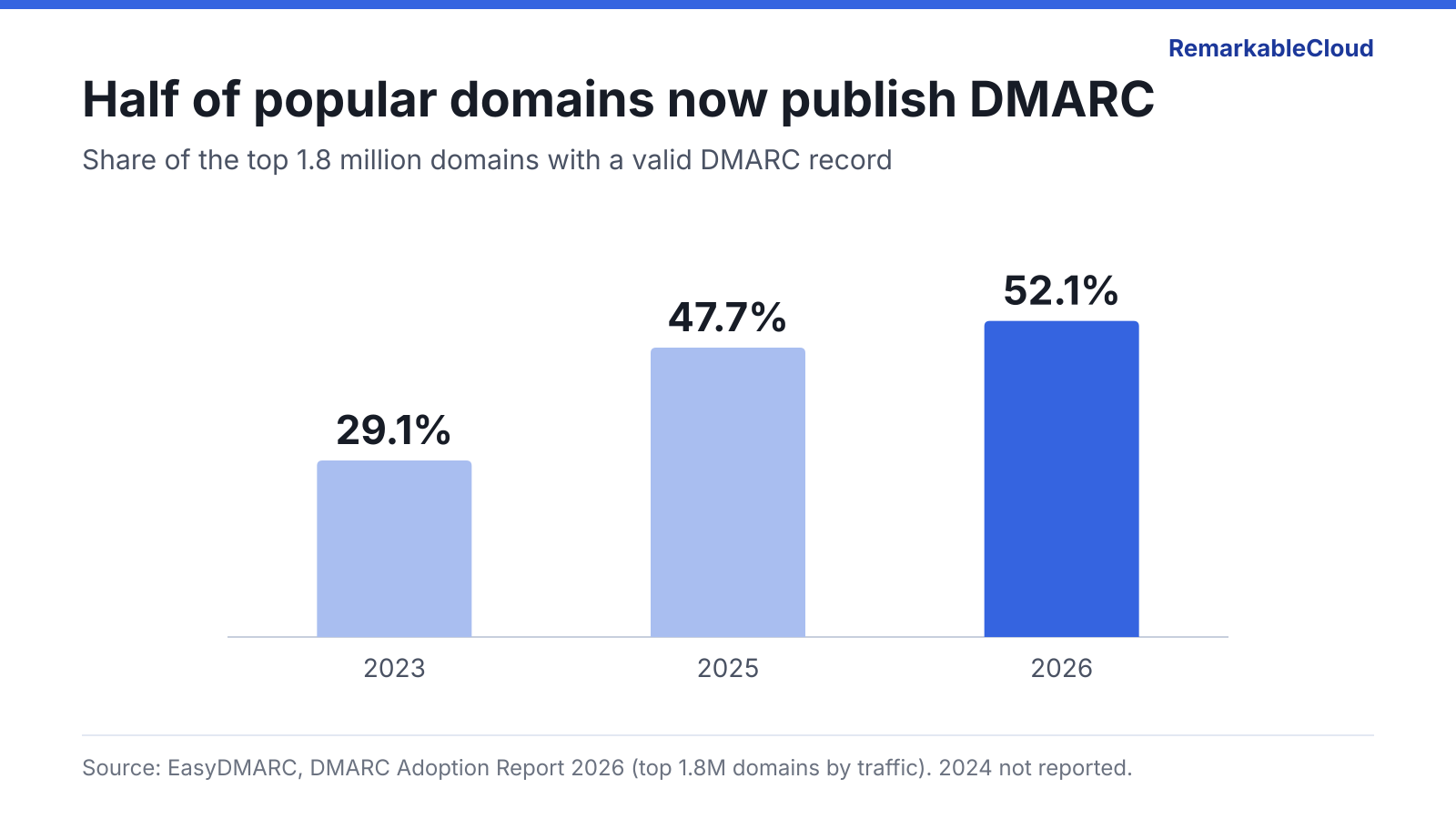
| 2023 | 29.1% |
| 2025 | 47.7% |
| 2026 | 52.1% |
The rules moved the needle. EasyDMARC scans the top 1.8 million domains by traffic every year. In 2023, 29.1% had a valid DMARC record. In early 2026, 52.1% did. Among Fortune 500 companies, the figure is 95%.
Publishing DMARC is not the same as enforcing it
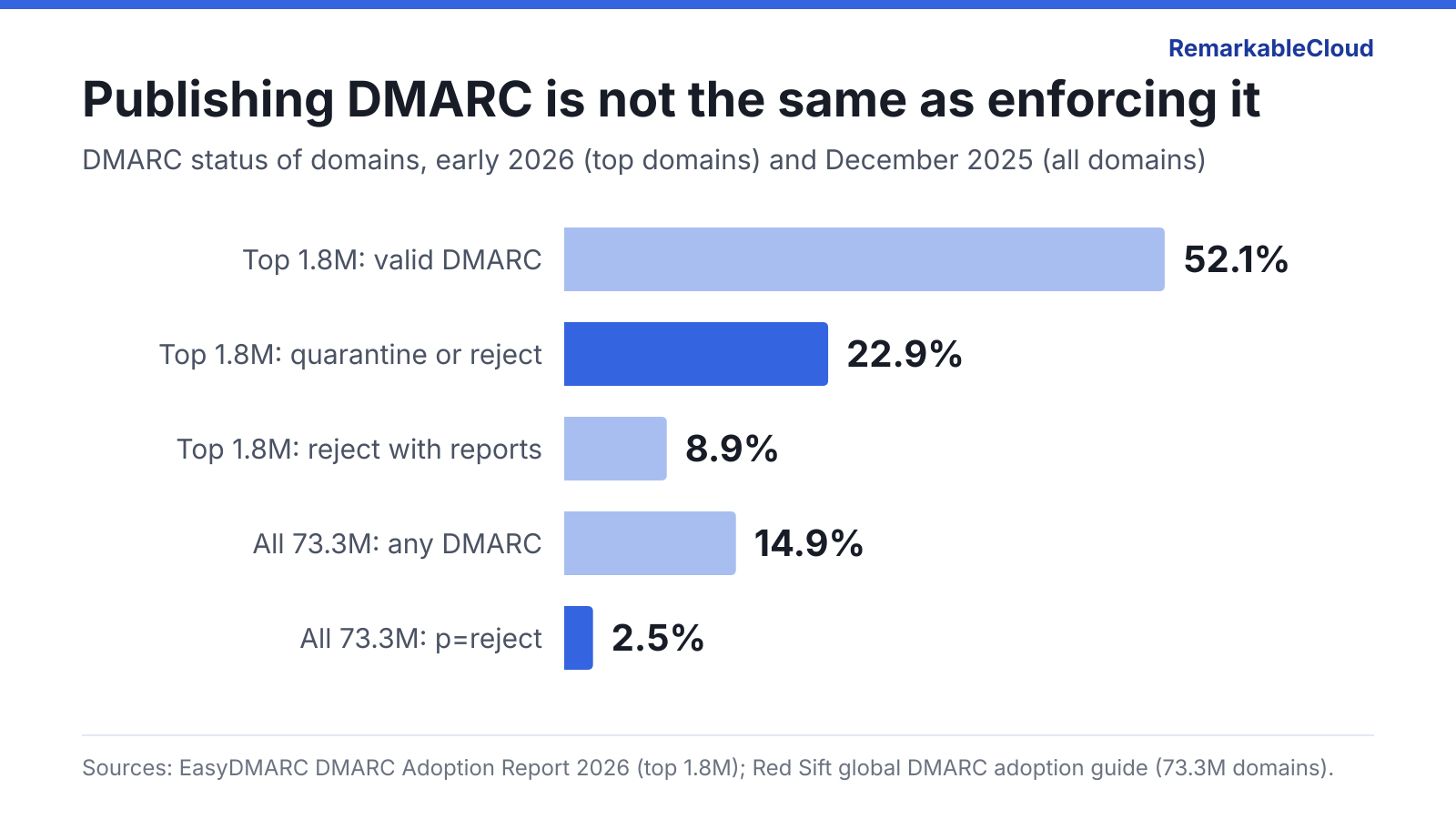
| Group | Measure | Share |
|---|---|---|
| Top 1.8M domains (early 2026) | Valid DMARC record | 52.1% |
| Top 1.8M domains (early 2026) | Policy of quarantine or reject | 22.9% |
| Top 1.8M domains (early 2026) | Reject, with aggregate reports | 8.9% |
| All 73.3M domains sampled (Dec 2025) | Any DMARC record | 14.9% |
| All 73.3M domains sampled (Dec 2025) | p=reject | 2.5% |
Two gaps stand out. First, most domains that publish DMARC stop at p=none, which only asks for reports: 29.2% of the top domains sit there, against 22.9% that tell receivers to quarantine or reject spoofed mail. That is enough for Gmail and Yahoo’s bulk-sender rules, but it does not stop someone else from sending mail as your domain.
Second, the long tail is far behind. Red Sift’s sample of 73.3 million domains found that only 14.9% had any DMARC record in December 2025, and 2.5% enforced p=reject. Most small business domains are in that long tail.
Check your domain in five minutes
Replace example.com with your sending domain. These checks use dig, which is on most Linux and macOS systems.
1. SPF. Look for one TXT record that starts with v=spf1. More than one SPF record breaks it, and Microsoft notes that more than 10 DNS lookups can make the check fail.
dig +short TXT example.com | grep spf12. DKIM. Your mail service tells you its selector (often default, google, selector1 or similar). The record should return a public key.
dig +short TXT default._domainkey.example.com3. DMARC. You want a record that starts with v=DMARC1. If nothing comes back, start with p=none and a reporting address, as Google’s own setup guide does, and give SPF and DKIM 48 hours to settle first.
dig +short TXT _dmarc.example.comA minimal starting record looks like this:
_dmarc.example.com. TXT "v=DMARC1; p=none; rua=mailto:dmarc-reports@example.com"4. Reverse DNS for your sending IP. If your server sends mail directly, its IP needs a PTR record, and that hostname must resolve back to the same IP.
dig +short -x 203.0.113.10
dig +short A mail.example.com
5. Read a real message. Send a message to a Gmail address, open it, choose More, then “Show original”. Gmail shows SPF, DKIM and DMARC results at the top. All three should say PASS.
6. Watch the numbers. Register your domain in Google Postmaster Tools. Its compliance dashboard shows whether you meet each requirement, and its spam rate is the number Google enforces.
7. Move toward enforcement. Once your DMARC reports show that all your legitimate mail passes, raise the policy to p=quarantine, then p=reject. That is the step that stops spoofing.
How this works on a RemarkableCloud server
Every server we sell is fully managed at no extra cost, so if your mail is bouncing with one of the codes above, open a ticket and our team will help you find which check is failing. Outbound mail from a server can also go through the MailChannels relay, one of only two optional add-ons on our servers; the other is Dual Backups.
If you are planning to move a site or a mail-heavy app to a server, see how our managed VPS works. For a deeper look at the three records, read our guide to SPF, DKIM and DMARC.
Methodology
- Requirements: taken from each provider’s own pages, checked on November 22, 2026. Google’s rules apply to mail sent to personal Gmail accounts, not to Google Workspace accounts. Google’s guidelines describe the threshold both as “close to 5,000” and “5,000 or more” messages a day. Microsoft’s April 2, 2025 post was updated on April 29, 2025 to say non-compliant mail is rejected from May 5, 2025; we use the updated wording.
- Error codes: Google’s published list of Gmail SMTP errors and Microsoft’s support page for error 550 5.7.515.
- Google’s 75% figure: Google’s October 3, 2023 announcement of the sender requirements. We did not use other impact figures that circulate secondhand but are not on a Google page we could open.
- DMARC adoption: EasyDMARC’s 2026 report scans the top 1.8 million domains by traffic (early 2026 snapshot; 2023 and 2025 values from the same report). Red Sift’s guide reports a sample of 73.3 million domains as of December 2025. The two use different samples and should not be read as one series.
Questions and answers
Who counts as a bulk sender for Gmail?
Anyone who sends roughly 5,000 messages to personal Gmail accounts from one primary domain in 24 hours, even once. After that, Google treats the domain as a bulk sender permanently, and subdomains count toward the parent domain.
What do Gmail, Yahoo and Outlook require from bulk senders?
SPF and DKIM passing, a published DMARC record, and a From domain that aligns with the authenticated domain. Gmail and Yahoo also require one-click unsubscribe for marketing mail, and Gmail requires TLS and valid reverse DNS.
Is a DMARC policy of p=none enough?
It meets the minimum for all three providers. It only asks for reports, though, so it does not stop someone else from sending mail as your domain. Quarantine or reject does.
What spam rate is too high?
Google wants the rate in Postmaster Tools below 0.1% and never at 0.3% or higher. On a list of 10,000 people, 0.3% is 30 spam clicks.
What happens to mail that misses the rules?
Since November 2025, Gmail has been turning missed requirements into temporary and then permanent rejections, with SMTP error codes that name the failed check. Microsoft rejects with error 550 5.7.515.
Sources and references
- Google, Email sender guidelines · support.google.com
- Google, Email sender guidelines FAQ · support.google.com
- Google, Gmail SMTP errors and codes · knowledge.workspace.google.com
- Google, set up DMARC · knowledge.workspace.google.com
- Google, new Gmail protections (Oct 2023) · blog.google
- Yahoo Sender Hub, best practices · senders.yahooinc.com
- Microsoft, Outlook's new requirements for high-volume senders · techcommunity.microsoft.com
- Microsoft, fix error 550 5.7.515 · support.microsoft.com
- EasyDMARC, DMARC Adoption Report 2026 · easydmarc.com
- Red Sift, global DMARC adoption · redsift.com