How to vibe code complex projects for dummies
You can build real, production-grade software with AI even if you are not a developer, but only if you treat planning and documentation as the actual work and the code as the easy part that comes after.
"Vibe coding" gets a bad reputation, and most of the time it deserves it. Someone opens an AI chat, types "build me an app," gets something that looks impressive for ten minutes, and then watches it collapse the moment they ask for the second feature. The code contradicts itself. Nothing is documented. The AI forgot what it built last session. The whole thing becomes an unmaintainable pile.
That is not how vibe coding has to work. There is a way to build genuinely complex software with AI as your engine, where the result is production-grade, maintainable, and does not fall apart under its own weight. It does not require you to be a programmer. It requires you to be disciplined about a few specific things.
This is the method. It is not about prompting tricks. It is about structure.
The three pieces you need
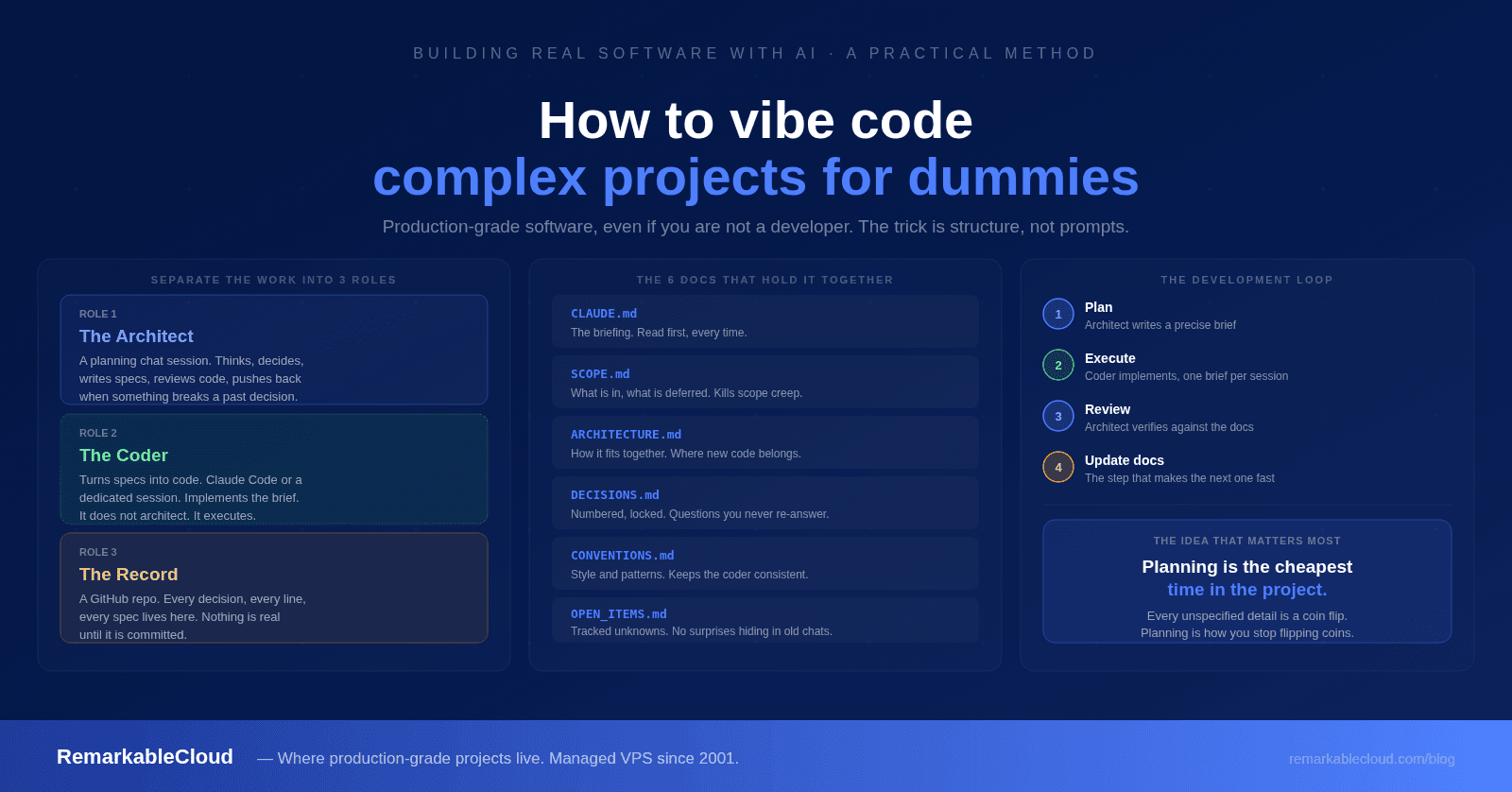
Forget the idea of one magic chat window that does everything. That is exactly the approach that collapses. Instead, you separate the work into three roles.
A Claude chat session where you think, plan, make decisions, and produce specifications. It translates your vision into precise technical instructions, reviews code, and pushes back when something conflicts with a past decision.
Where instructions become code. This can be Claude Code (a command-line tool with direct file access), or a separate chat session you paste briefs into. Its only job is to implement the spec. It does not architect.
A GitHub repository. Every decision, every line of code, every specification lives here. Git history is your audit trail. Nothing is real until it is committed.
The workflow is a loop: the architect produces a brief, the coder executes it against the repo, you review, approved work gets committed. The architect can read the repo to verify what the coder actually built. Separating these roles is the single structural decision that keeps a complex project from collapsing.
Why one chat window fails
When you try to do everything in a single long conversation, two things go wrong. First, the session accumulates noise. After a few hours it has so much context that the signal degrades and it starts forgetting or contradicting earlier choices. Second, when that session ends, everything it "knew" disappears. There is no durable record. The next session starts from zero, or worse, from a confused half-memory.
The fix is that the documents, not the chat session, are the durable layer. A session that produced a brief has done its job and can be closed. The brief carries the result forward. If your documentation is good, a brand new session can pick up exactly where the last one left off within minutes. The chat is disposable. The docs are permanent.
The six documents that hold everything together
Every project, regardless of size, needs these six files. A weekend project has six short files. A complex system has six detailed ones. The structure scales by depth, not by adding more types of document.
| File | What it is | Why it matters |
|---|---|---|
| CLAUDE.md | The briefing. What the project is, the stack, the rules, what not to do. | The coder reads this first, every time. It is the new-developer onboarding doc. |
| SCOPE.md | What is in this version, and what is explicitly deferred. | The deferred list stops scope creep. "Is this in scope?" gets answered by a file, not a debate. |
| ARCHITECTURE.md | How the system is put together. Components, data flow, what lives where. | Tells the coder where new code belongs, so every task is not a structural guess. |
| DECISIONS.md | Numbered, locked decisions with rationale. | Each locked decision is a question you never have to answer again. |
| CONVENTIONS.md | Code style, naming, patterns, error handling. | Makes the thousands of micro-decisions the coder makes consistent. |
| OPEN_ITEMS.md | Tracked unknowns and things not yet decided. | Keeps unknowns visible instead of hiding in dead chat sessions. |
The two most underrated are DECISIONS.md and SCOPE.md's deferred list. Both exist to stop you from re-litigating settled questions. When the AI suggests something you already rejected, you point to the decision number or the deferred list and move on. A mature project might have 30 or 40 locked decisions, and that is healthy. Each one is a coin you never have to flip again.
If your project has a user interface, add a seventh: DESIGN.md, holding your color palette, typography, spacing, and component style. Create it the moment UI work begins. It does for visual decisions what CONVENTIONS.md does for code.
The planning phase is where you win or lose
This is the single most important idea here, so read it twice. The time you spend planning is not overhead. It is the cheapest time in the entire project. Every hour of precise planning saves you many hours of coding, debugging, and reworking.
The coder builds exactly what you specify. If you do not specify something, it fills the gap with an assumption. Sometimes the assumption is fine. Often it is not, and you do not find out until you are testing the app and something behaves in a way you never intended. Every unspecified detail is a coin flip. Planning is how you stop flipping coins.
A wish is not a specification
"Add a dashboard that shows server status."
"Add a dashboard at /dashboard showing the user's servers as cards, three per row on desktop, one per row on mobile. Each card shows name, status dot (green online, red offline, yellow degraded), CPU percent, memory percent, last-seen time. Sort by status, problems first, then alphabetically. No servers: show an empty state with a 'Connect your first server' button. Data older than 60 seconds: dim the card and show 'Reconnecting...'."
The second version is longer, but every minute you spend writing it saves an hour of "that is not what I meant" later. The coder cannot read your mind. The specification is the mind-reading, done in advance.
Walk the user journey out loud
Before writing a brief, trace the feature as if you were the user. The user lands on the login page. What do they see? They enter their email and password and click login. What happens? Loading state. Credentials correct, they reach the dashboard. But what if the credentials are wrong? What does the error look like? What if they forgot their password? What if their account is locked? What if the server takes five seconds to respond?
Every one of those questions is a branch, and each branch is something the coder has to build. Walk the journey during planning and every branch goes in the brief and gets built correctly at once. Skip it and you discover the branches one at a time during testing, each one a surprise, each one a patch.
"What happens if..." is the question that prevents bugs
Most bugs live in the cases nobody thought about. Everybody specifies the happy path. The bugs are in the edges. For every feature, ask: What if the input is empty? Malformed or absurdly large? What if the network request fails? What if the user does this twice quickly? What if two users do it at the same time? What if the data does not exist yet? What if they lack permission? What if an external service is down?
You do not need to be a programmer to ask these. They are product questions, not technical ones. A useful move: when you finish a brief, hand it back to the architect session and ask "what edge cases or failure modes am I not accounting for?" Finding the gaps now is free. Finding them in production is expensive.
Build escape hatches into every instruction
This is the highest-leverage thing you can set up, and it matters most if you are not a programmer. An escape hatch is a standing instruction that tells the AI what to do when it hits something uncertain, instead of guessing.
The default failure mode of any AI coder is this: it hits something ambiguous, makes a reasonable-sounding assumption, and keeps going. The assumption is invisible to you until it surfaces later as a bug. Escape hatches turn those silent assumptions into questions you get to answer. Put these in your CLAUDE.md and your Project instructions so they apply to every session:
"If you don't understand something, ask. Do not assume."
The foundational one. It overrides the coder's tendency to fill gaps silently. The question costs you 30 seconds. The wrong assumption costs you a debugging session.
"If a decision needs making and I haven't specified it, stop and surface it. Explain the options, the pros and cons, and give me your recommendation."
This is the escape hatch for non-programmers specifically. You do not need to understand the technical details. You need the choices laid out, the trade-offs in plain language, and a recommendation you can accept or override. You stay the decision-maker without being the engineer.
"If a request conflicts with a locked decision or the current scope, flag it before proceeding."
Protects your architecture and timeline from drift. If you accidentally ask for something that contradicts a past decision, you want to be told, not silently obeyed.
"If you notice a problem with my plan, tell me even if I didn't ask."
You want a collaborator, not an order-taker. If the AI sees a hole in your logic, you want it surfaced while it is still cheap to fix.
The pattern across all of these: you are converting the AI's silent judgment calls into explicit moments where you decide. That is what keeps you in control of a technical project without needing to understand every line of code.
The development loop
Plan (architect session)
You describe what you want. The architect asks clarifying questions, checks against existing decisions and scope, and produces a brief: a precise specification with the full behavior, every "what happens if" branch, the design details, and what NOT to do.
Execute (coder)
Hand the brief to the coder. It reads the docs, reads the brief, and implements. One brief per session. The escape hatches earn their keep here: a well-instructed coder stops and asks when the brief leaves something open.
Review (back in the architect session)
Ask the architect to verify what was built against the brief and the architecture doc. "Read the changed files and confirm the architecture matches ARCHITECTURE.md." Structural claims get verified against the actual files.
Update the docs
The step most people skip, and the one that makes the next session productive instead of confused. New decisions go in DECISIONS.md. Resolved unknowns get marked in OPEN_ITEMS.md. The docs must reflect reality after every milestone.
The mistakes that wreck vibe-coded projects
The docs take a few hours. Skipping them costs weeks of rework when the coder builds something that does not match a vision you never wrote down.
The coder implements, it does not architect. Architectural decisions belong in the planning session where you can weigh trade-offs and log the outcome. If the coder hits an architectural question mid-task, it should stop and ask, not guess.
Stale docs are worse than no docs because they create false confidence. If the code diverges from the docs, the next session produces instructions based on a reality that no longer exists.
A session running for hours has accumulated context, but also noise. The signal-to-noise ratio degrades. Start fresh, let the docs carry the context, and move on.
"The coder says it works" is not verification. Read the files. Check the structure. Catching issues at review time is far cheaper than catching them in production.
If your brief describes what happens when everything works and says nothing about failures or edge cases, the coder invents its own handling. Either way you get behavior you did not choose.
A note on cost, and why it is worth it
This workflow uses more tokens than a single-session approach. The architect reads docs, produces briefs, reviews code. The coder reads docs, executes, commits. There is inherent duplication.
The trade-off is worth it. The alternative, one long session trying to do everything, produces code that drifts from your vision, makes undocumented decisions, and cannot be resumed when the session ends. The cost of rework from a bad implementation far exceeds the cost of the extra tokens spent on planning and review. And as your docs mature, the token cost per task actually drops, because the docs carry more context and the conversations need less back-and-forth.
Getting started in 30 minutes
You do not need to build the whole structure perfectly on day one. You need the skeleton. Here is the fastest path:
- Create a GitHub repo with a docs/ folder
- Write CLAUDE.md: what the project is, the stack, basic rules, and the escape-hatch instructions (15 min)
- Write SCOPE.md: what is v1, what is deferred (5 min)
- Write a rough ARCHITECTURE.md: components and how they connect (10 min)
- Create empty DECISIONS.md, CONVENTIONS.md, and OPEN_ITEMS.md with one example entry each
- If your project has a UI, ask the planning session to propose a palette and typography, then save it in DESIGN.md
- Create a Claude Project, paste your instructions (including the escape hatches), upload the docs
- Set up your coder and clone the repo
- Start your first planning session: "Here is what I want to build. Let's walk the user journey, then write the first brief."
The docs will be rough. That is fine. They improve with every session, every decision, every milestone. The structure is what matters on day one, not the polish.
That is the whole secret to vibe coding something real. Not better prompts. A disciplined separation of planning from execution, a durable set of documents that survive any individual session, and standing instructions that turn the AI's silent guesses into decisions you get to make. Get those three things right and you can build software far more complex than anyone would expect, without writing the code yourself.
Built something real? It needs somewhere reliable to live.
When your vibe-coded project is ready for production, a managed VPS gives it room to run without the shared hosting limits. Free migration, 500% SLA, fully managed since 2001. First month from $2.00.
See Cloud Cube plans