
What is Anycast DNS and Why Do You Need It?
Updated March 2026 8 min read RemarkableCloud Team
What is Anycast DNS, and why do you need it?
Every time someone visits your website, their browser starts by sending a DNS query: “where is this domain’s server?” The answer to that query determines how fast the connection starts, whether the site loads at all if a server is unreachable, and how resilient the infrastructure is under attack or failure.
See it in action: the DNS propagation checker shows anycast resolvers answering live, and the DNS health test grades your whole zone.
Anycast DNS is the technology that makes that first step faster, more reliable, and more attack-resistant. Understanding how it works: and how it differs from traditional DNS routing: helps you make better decisions about your hosting infrastructure and domain setup.
Key takeaways
- Anycast DNS assigns the same IP address to multiple DNS servers worldwide. Queries route to the nearest one automatically.
- Unicast DNS (traditional) routes all queries to one specific server, regardless of the visitor’s location.
- Anycast reduces DNS resolution time, absorbs DDoS attacks by distributing traffic, and provides automatic failover when a node goes down.
- Most quality DNS providers use Anycast by default. It’s not something you configure: it’s a feature of the provider’s network.
How DNS works: the baseline
Before Anycast makes sense, the baseline needs to be clear. When a visitor types your domain into a browser, this happens in under a second:
- The browser checks its local cache. If it has a recent DNS record for your domain, it uses it.
- If not, it asks the operating system’s resolver, which checks its own cache.
- If still not cached, the resolver queries a recursive DNS server (often provided by the ISP or a public resolver like 8.8.8.8).
- That recursive resolver queries your domain’s authoritative nameservers to get the current IP address.
- The IP address is returned, cached, and the browser connects to your server.
The authoritative nameservers in step 4 are what your domain registrar or DNS provider controls. This is where Anycast vs unicast makes a real difference.
Unicast DNS: one server, one location
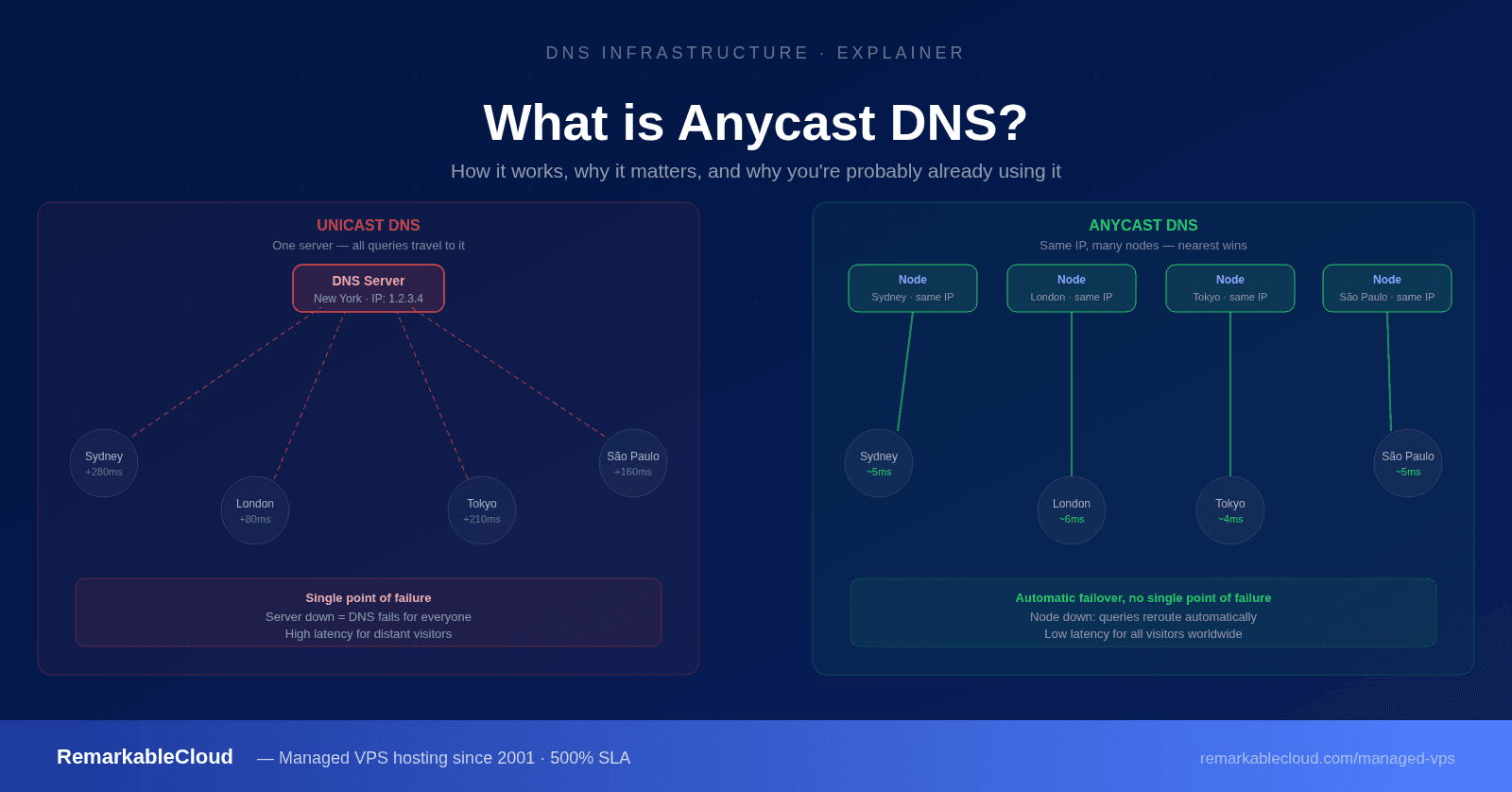
Traditional unicast DNS works like any other point-to-point network communication: a specific IP address points to a specific physical server in a specific location. Every DNS query for your domain goes to that server, regardless of where the visitor is in the world.
If your authoritative nameserver is in New York, a visitor in Sydney, Tokyo, or Frankfurt still sends their DNS query all the way to New York and waits for the response to travel back. For most websites this adds 50 to 300ms before the connection even starts. It also means that if that server goes down for any reason, DNS resolution for your entire domain fails until it comes back.
Anycast DNS: the same address, many locations
Anycast DNS solves this by advertising the same IP address from multiple locations simultaneously. The network infrastructure: routers using BGP (Border Gateway Protocol): automatically routes each DNS query to the nearest server advertising that IP address.
From the visitor’s browser perspective, it’s making a request to a single IP address. Underneath, that request is going to a server in the same region as the visitor: not to a single server on the other side of the planet.
Unicast DNS vs Anycast DNS
UNICAST DNS
1 server (NY)
Sydney
Tokyo
Frankfurt
All queries travel to one location High latency for distant visitors
ANYCAST DNS
Node (Sydney) same IP
Node (Tokyo) same IP
Node (Frankfurt) same IP
Sydney
Tokyo
Frankfurt
Each query goes to nearest node Minimal latency for all visitors
Why Anycast DNS matters for your website
Faster DNS resolution globally
DNS resolution happens before your server receives a single request. Shaving 100ms off DNS resolution time improves load time for every visitor, on every page, without touching your server or application. For visitors close to your DNS provider’s servers, unicast is fast. For visitors in other regions, Anycast is measurably faster because the authoritative nameserver is geographically close to them.
Automatic failover when a node goes down
With unicast DNS, if your authoritative nameserver goes down, DNS resolution for your domain fails entirely until the server recovers or you manually update records. With Anycast, if a node in one region goes down, BGP routing automatically redirects queries to the next nearest node. Users in the affected region experience a slightly longer DNS resolution time while their queries reroute: but resolution doesn’t fail. From the user’s perspective, the site stays up.
DDoS absorption
DNS infrastructure is a common DDoS target. A large volumetric attack against a unicast DNS server saturates a single server’s bandwidth and network capacity, taking down DNS for the entire domain. Against an Anycast network, the same attack traffic is distributed across every node in the network. Each node absorbs a fraction of the attack. Providers with large Anycast networks: hundreds of Tbps of total capacity: can absorb attacks that would instantly overwhelm any single server. This is why all major DDoS-resilient DNS providers use Anycast.
Load distribution
High-traffic domains generate enormous volumes of DNS queries. Anycast naturally distributes that query load across regional nodes based on geographic proximity. No single server becomes a bottleneck, and adding capacity to the DNS layer means deploying additional nodes rather than scaling a single server vertically.
Unicast vs Anycast: the key differences
| Factor | Unicast DNS | Anycast DNS |
|---|---|---|
| IP address assignment | One IP, one server, one location | One IP, many servers, many locations |
| Query routing | All queries to same server | Each query routes to nearest node |
| Global latency | High for distant visitors | Low for all visitors |
| Single point of failure | Yes: server down = DNS fails | No: queries reroute automatically |
| DDoS resilience | Vulnerable: single target | Distributed absorption |
| Load distribution | All load on one server | Distributed by geography |
| Configuration complexity | Simple | Handled by provider |
| Who uses it | Small/legacy deployments | Cloudflare, AWS Route 53, BunnyCDN DNS, major providers |
Where Anycast DNS fits in your infrastructure
Anycast DNS handles the domain resolution layer: it doesn’t affect what happens once a visitor’s browser connects to your server. Your origin server still processes requests and your hosting infrastructure still determines performance under load.
The full picture of fast, resilient website infrastructure involves several layers:
- Anycast DNS: fast, resilient domain resolution globally
- CDN (e.g. BunnyCDN): cached content served from edge nodes close to visitors
- Origin server: handles dynamic requests, processes PHP and database queries
- Server management: keeps the origin healthy through monitoring, updates, and incident response
Each layer handles a different part of the performance and reliability picture. Anycast DNS improves the first step. A CDN improves cached content delivery. A well-managed VPS handles everything that can’t be cached.
RemarkableCloud’s managed VPS handles layer 4: the origin server. Server health, uptime, and performance are managed proactively. 500% SLA covers the part that DNS and CDN can’t.
Do you need to configure Anycast DNS?
For most website owners and hosting customers, the answer is no: it’s already configured for you. Most quality DNS providers operate Anycast networks by default. When you use Cloudflare DNS, AWS Route 53, BunnyCDN DNS, or another enterprise-grade DNS provider, you’re already using Anycast without doing anything specific to enable it.
What you do need to do is choose a DNS provider that operates an Anycast network rather than a unicast nameserver. If your domain is currently using your registrar’s default nameservers (often named something like ns1.registrarname.com), check whether those nameservers are Anycast. Many budget registrars still provide unicast nameservers as the default. Switching to a provider like Cloudflare’s free DNS or BunnyCDN DNS takes about 10 minutes and immediately provides Anycast resolution for your domain.
How to check if your current DNS uses Anycast
The simplest method is to run a DNS lookup from multiple geographic locations and compare the response times. Tools like DNSChecker.org or DNSMap.io show resolution results from servers around the world. If responses are consistently fast regardless of location, you’re likely on an Anycast network. If distant regions show much slower responses, your nameservers are probably unicast.
Anycast DNS for hosting providers and agencies
If you run hosting for clients through RemarkablePanel, DNS management is part of the control panel. RemarkablePanel handles DNS zones for hosted domains, giving your clients the DNS management interface they need without requiring separate DNS provider accounts.
For agencies managing multiple client domains, a consistent DNS provider choice (Cloudflare or BunnyCDN DNS are both strong options) simplifies management and ensures all clients benefit from Anycast resolution without individual configuration per domain.
Great DNS is just the start
Anycast DNS gets visitors to your server faster. RemarkableCloud makes sure the server is ready when they arrive: fully managed, proactively monitored, 500% SLA.
Free migration · 500% SLA · RemarkablePanel included
FAQ
What is the difference between Anycast and unicast DNS?
Unicast DNS assigns a unique IP address to one specific server. All DNS queries go to that server regardless of where the visitor is located. Anycast DNS assigns the same IP address to multiple servers in different geographic locations, and the network automatically routes each query to the nearest server. Anycast is faster for global audiences, more resilient to failures, and better at absorbing DDoS attacks.
Do I need to configure Anycast DNS manually?
No. Anycast is a feature of the DNS provider’s network infrastructure, not something you configure at the record level. When you use a DNS provider that operates an Anycast network (Cloudflare, AWS Route 53, BunnyCDN DNS), you automatically benefit from Anycast routing. The configuration is done by the provider, not by you.
Is Anycast DNS free?
Yes, from most major providers. Cloudflare’s DNS (1.1.1.1 as a resolver and their authoritative DNS) is free and Anycast. BunnyCDN includes Anycast DNS with their CDN plans and as a standalone product. AWS Route 53 is paid but uses Anycast. For most websites, a free Anycast DNS provider is more than sufficient.
How much does Anycast DNS improve website speed?
For visitors geographically close to your existing nameservers, the improvement is small. For visitors in regions far from your current nameservers, switching to Anycast can reduce DNS resolution time by 50 to 200ms per query. Multiply that by every page visit and every asset that requires a DNS lookup, and the cumulative effect on perceived load time is meaningful, particularly for global audiences.
Does Anycast DNS help with DDoS protection?
Yes, significantly. A volumetric DNS DDoS attack against a unicast nameserver concentrates all malicious traffic on a single target. Against an Anycast network, that same traffic is distributed across all nodes globally. Each node absorbs a fraction of the attack. Major DNS providers with hundreds of Tbps of Anycast capacity can absorb attacks that would instantly take down any single server.